

Smart Canteen Hardware Installation: 1. Pre-Installation Preparation
Deploying a modern Smart Canteen Hardware Installation has become a vital strategic step for businesses aiming to optimize workflow. The installation of hardware and software for a smart canteen is a systematic engineering project that involves network environments, power supply, spatial layout, and various other aspects. First, it is necessary to assess the canteen’s existing infrastructure, including Wi-Fi signal coverage and strength, power outlet locations and quantities, as well as the spatial dimensions of dining tables and meal serving counters. It is generally recommended to conduct an on-site survey prior to installation to record critical data. For example, for a canteen area of approximately 200 square meters, at least three wireless access points (APs) must be deployed to ensure network stability. The hardware equipment primarily comprises smart checkout counters, facial recognition terminals, self-service ordering kiosks, and kitchen display systems (KDS). Each device requires an independent IP address; therefore, network subnets should be planned well in advance. On the software side, server or cloud platform accounts are needed for data synchronization and management. It is recommended to communicate with the manufacturer’s technical team before installation to confirm the equipment checklist and installation blueprints, thereby preventing omissions. According to industry experience, thorough pre-installation preparation can shorten installation time by approximately 30% and significantly reduce subsequent failure rates.
2. Key Steps for Hardware Installation
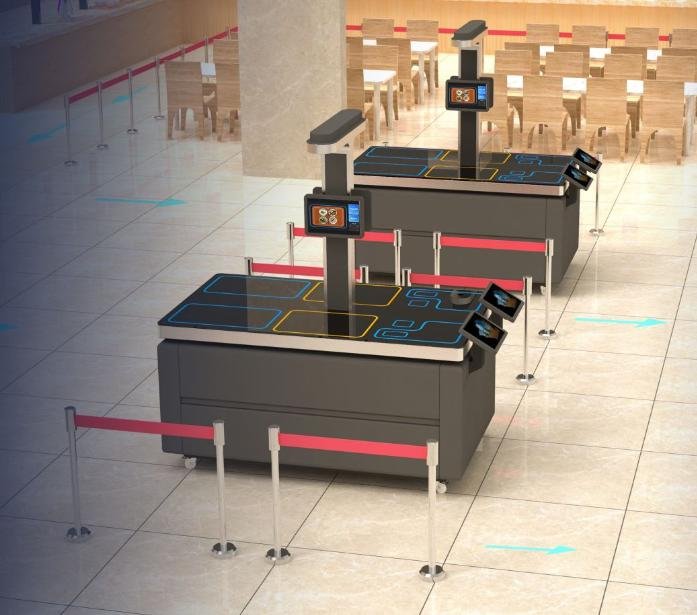
Hardware installation begins with cabling. Power cabling should utilize 2.5 mm² copper core wires equipped with voltage stabilizers to prevent voltage fluctuations from damaging the equipment. Network cables should be Cat5e or Cat6 shielded twisted-pair cables, with run lengths not exceeding 100 meters to guarantee signal integrity. When installing the smart checkout counter, it must be firmly anchored to a flat, stable surface. The counter height is typically set at 75 cm to facilitate comfortable user operation. Cameras should be mounted at a height of 1.5 to 1.8 meters above the ground, tilted downward at an angle of 15 degrees to ensure full facial capture. Self-service ordering kiosks require adequate ventilation clearance, maintaining at least 20 cm of space from the wall. When wall-mounting kitchen display screens, the center of the display should be 1.3 meters above the floor, aligned with the operator’s eye level. Once all equipment is mounted, power-on testing must be performed to check indicator lights and startup sounds. If card readers with NFC functionality are deployed, their induction range must also be tested, which should typically be effective within 2 cm.
3. Software Configuration and System Commissioning
Once hardware is in place, software configuration is critical. First, set up the management backend by logging into the cloud platform or local server via a web browser to configure basic canteen parameters, such as menus, pricing, and employee accounts. Smart checkout counters need to connect to the database via local area network (LAN) or public IP addresses for seamless data exchange. Facial recognition terminals require employee facial templates; at least three photos from different angles should be captured for each individual to maximize recognition accuracy. The user interface of self-service ordering kiosks requires customization, with dish images recommended at a resolution of 300 dpi and icon sizes optimized for touchscreen operation. Kitchen display systems are configured with order dispatch rules, such as prioritizing orders with wait times exceeding 30 minutes. During the system commissioning phase, stress testing must be performed by simulating peak hours where 100 people place orders simultaneously, ensuring server response time does not exceed 2 seconds. If latency or stuttering occurs, database indexing can be tuned or cache servers added. Furthermore, software versions must be kept up to date; manufacturers typically release quarterly updates to patch known vulnerabilities.
4. Operational Tips and Optimization Recommendations
After installation is complete, observing several operational tips during daily use can significantly enhance the user experience. First, regularly clean the camera lens by wiping it once a week with a soft cloth to prevent oil film or grease buildup from degrading recognition rates. Second, calibrate the weighing module on the checkout counter once a month using standard calibration weights; if the error exceeds 5 grams, recalibration is required. Third, leverage backend data analytics to optimize the menu; for instance, if sales reports reveal that a particular dish has sluggish sales, its layout position can be adjusted or replaced. For scenarios with high-throughput concurrent checkouts, it is recommended to enable the “batch recognition” feature: when canteen occupancy exceeds 200 people, the system automatically switches to continuous recognition mode, significantly cutting down queue times. Additionally, kitchen display screens can feature “color-coded alerts”—red for overdue orders and yellow for orders nearing the deadline—helping chefs prioritize their workflow. Derived from practical project experience, these techniques can effectively boost canteen operational efficiency by around 20%.
5. Common Issues and Troubleshooting Solutions
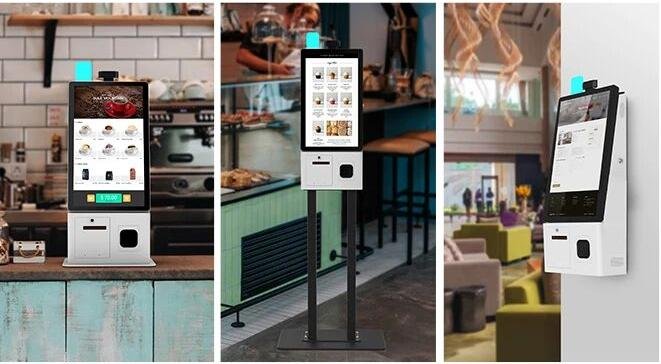
During installation or daily operation, several common issues may arise. Typical scenarios and their solutions include: Facial recognition failure is usually caused by excessive glare or insufficient ambient lighting; this can be resolved by adjusting the camera’s exposure compensation or adding fill lights. Billing discrepancies occur when dish prices are incorrectly configured in the backend, or foreign objects jam the weight sensor. Network disconnection leading to offline devices can be solved by restarting the router or switching to a backup network; setting static IP addresses on devices can also prevent IP conflicts. Touchscreen unresponsiveness on ordering kiosks can be addressed by cleaning the display surface or recalibrating touch parameters. Kitchen receipt printers failing to print tickets should be checked for Bluetooth connectivity issues or thermal paper replacement. Most of these problems can be resolved with a device reboot or minor adjustments; if issues recur frequently, contact manufacturer technical support. It is highly recommended that canteen operators maintain technical documentation recording device serial numbers and firmware versions for rapid troubleshooting.
6. Industry Trends and Future Outlook
With the widespread adoption of Internet of Things (IoT) technologies, smart canteen installations are trending toward modularization and wireless architectures. For example, some manufacturers have introduced wireless, cabling-free solutions that transmit data over 4G/5G cellular networks, significantly reducing construction complexity. Hardware integration is also advancing: all-in-one checkout counters integrate card readers, weighing modules, and cameras into a single compact terminal, slashing installation time to under two hours. On the software front, continuous AI algorithm upgrades have elevated facial recognition accuracy to 99.9%, even when users wear masks or glasses. In the future, smart canteens will integrate more sensors, such as temperature sensors to monitor food warming conditions and smart water meters to track water consumption. These advancements make installations simpler and maintenance costs lower. For facility managers, it is advisable to evaluate equipment performance every two years and upgrade hardware and software promptly to keep canteen operations at the cutting edge. Through systematic installation and scientific maintenance, smart canteens not only cut labor costs but also elevate diner satisfaction, ultimately achieving the goal of digitalized management. In summary, integrating the right Smart Canteen Hardware Installation provides long-term operational resilience, reduced labor friction, and enhanced customer satisfaction.
Looking for customized Smart Canteen Hardware Installation solutions, commercial touchscreen displays, or OEM/ODM self-service hardware? Feel free to contact the ZXTLCD engineering team for free consultations, product samples, and tailored technical specifications.
Deploying a Self-Service Solution?
To elevate customer experience and streamline ordering or ticketing workflows, explore our AI Self Service Terminal with Large Touchscreen or the versatile Self Service Kiosk for Cinema & Ticketing. For custom hardware integrations, discover our complete line of Custom Self-Service Kiosks or consult our engineering team for sample evaluation.


