

Deploying a modern Self-Service Kiosk Customer Adoption has become a vital strategic step for businesses aiming to optimize workflow. Self-service ordering has evolved into one of the most mature solutions in restaurant digitalization. By browsing digital menus, choosing dishes, submitting orders, and completing payments directly on interactive tablets or standalone kiosks, customers help restaurants eliminate repetitive manual labor.
Yet, some patrons consistently overlook these self-service ordering kiosks, preferring instead to order directly from waitstaff.
This customer behavior is quite understandable.
Historically, customers only needed to voice what they wanted, and the server handled the rest. Using a self-service kiosk requires them to actively browse the menu, select items, configure modifiers, add selections to the cart, review the order, and complete payment.
Because human habits are deeply ingrained and rarely shift overnight, it is entirely natural that some diners continue to lean toward traditional manual ordering even when kiosks are readily available.
Self-Service Kiosk Customer Adoption: How Can Restaurants Guide Customers to Embrace Self-Service Kiosks?
Unlocking the true value of self-service ordering kiosks involves far more than simply placing hardware on the dining room floor—it requires guiding customers through a natural transition period.
During the initial rollout phase, restaurants should adopt a gradual, step-by-step strategy to introduce diners to this new ordering model.
For example, a store with multiple counter registers can retain some manual cashier lanes while deploying kiosks, stationing friendly staff nearby to assist first-time users.
When patrons realize that self-service kiosks noticeably slash wait times, they naturally become more willing to give them a try.
Over time, as customers become familiar with the kiosk workflow, restaurants can incrementally increase the ratio of self-service kiosks to manual registers based on actual usage patterns.
The ultimate goal is not to force customers to adopt self-service, but to help them organically form new ordering habits through positive, frictionless dining experiences.
Give Customers Time, and Give Staff Time
Assigning team members to guide guests through self-service ordering is an essential strategy for cultivating long-term user habits.
When approaching a kiosk for the first time, customers may feel hesitant about where to begin, how to customize dish specifications, or how to finalize payment.
In these moments, a brief, welcoming prompt from staff—such as “Feel free to use the kiosk here to skip the line” or offering a quick walkthrough during their first order—makes all the difference.
Once customers master the intuitive flow, their subsequent ordering experiences become second nature.
Simultaneously, restaurant staff also need time to adapt to new operating dynamics. With kiosks handling routine order-taking and cashiering, employees can redirect their attention toward meal preparation, packaging, dining room upkeep, and personalized customer care.
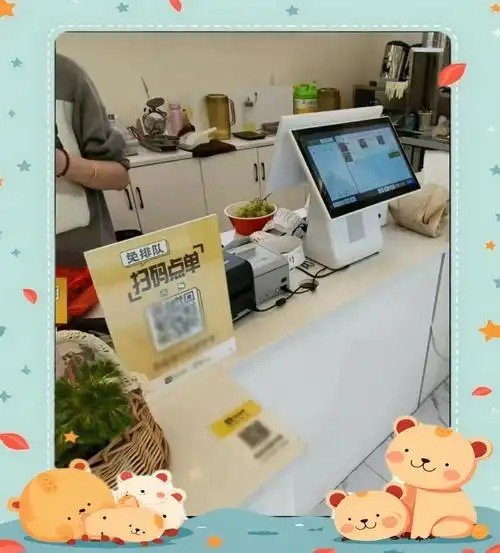
Self-Service Ordering as a Key Driver of Catering Digitalization
Beyond reducing manual labor, self-service kiosks fundamentally optimize restaurant ordering workflows.
Traditional manual ordering requires staff to write down orders ticket by ticket. Self-service kiosks enable diners to browse, customize, and confirm selections on high-definition screens independently.
Once generated, orders are seamlessly routed to backend management systems and kitchen printers, eliminating handwritten errors and miscommunication.
Furthermore, self-service kiosks ease counter congestion during rush hours, allowing multiple parties to place orders simultaneously across several terminals.
For restaurant operators, deploying kiosks is not merely about adding new hardware—it represents a comprehensive digital upgrade of the ordering workflow.
How ZXTLCD Self-Service Ordering Kiosks Support Restaurant Adoption
ZXTLCD self-service kiosks feature vibrant high-definition touchscreens that present interactive electronic menus clearly and engagingly.
Customers can intuitively browse categories, check prices and combo deals, select custom modifiers, verify orders, and settle payments on responsive touchscreens.
Hardware configurations can also include thermal receipt printers, 2D barcode scanners, and payment peripherals tailored to integrate seamlessly with existing restaurant management software.
Order Pickup by Receipt
After completing their order, customers pick up meals using printed receipts or call-number notifications, establishing a streamlined, orderly front-of-house pickup flow.
Direct Kitchen Order Transmission
Kiosk-generated orders route directly to backend kitchen display systems (KDS) and ticket printers according to pre-configured workflows, eliminating redundant manual data entry and speeding up meal prep.
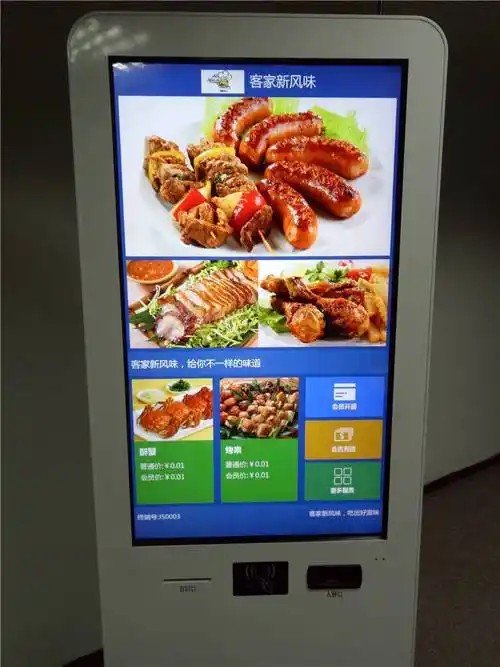
Custom Electronic Menu Configuration
Restaurants can easily tailor the kiosk user interface to reflect their brand aesthetics, showcasing dishes, combo packages, real-time pricing, and ingredient details on large digital displays.
Flexible Digital Menu Adjustments
Compared to static printed paper menus, digital menus can be updated instantly based on daily operational needs—allowing managers to update seasonal specials, adjust prices, add combos, or flag sold-out items without costly reprints.
Best Practices for Getting Customers to Genuinely Embrace Self-Service
Whether customers embrace self-service kiosks depends not only on the hardware itself, but on how effectively the restaurant guides their journey.
1. Allow Time for Adjustment: Avoid mandating kiosk use on day one. Run manual and self-service channels in parallel to cultivate customer habits gradually.
2. Ensure High Visibility: Place kiosks in prime, high-traffic locations with clear visual signage indicating that self-service ordering is available.
3. Offer Friendly First-Time Assistance: Staff do not need to operate the kiosk on behalf of guests—just be nearby to offer helpful pointers when users hesitate.
4. Maintain Manual Cashiers as a Fallback: Keep a manual service counter open for elderly diners, guests unfamiliar with digital devices, or patrons with complex custom orders.
By following this approach, self-service kiosks become a welcoming, convenient dining option rather than an imposed burden.
The Essence of Kiosks Is Never Just “Replacing Labor”
Many restaurant operators initially view kiosks solely through the lens of headcount reduction.
In reality, the deeper commercial value of self-service ordering lies in delegating standardized, repetitive tasks to smart machines, freeing human staff to focus on empathy, hospitality, and complex service needs.
Customers customize their meals, machines capture structured orders, systems transmit data instantly, and staff handle exceptions and deliver warm customer care.
This collaborative synergy unlocks the full potential of smart self-service equipment.
As the catering sector continues its journey toward digital and intelligent operations, self-service ordering will remain a cornerstone of workflow optimization.
ZXTLCD provides commercial self-service ordering kiosks and interactive touch display terminals tailored to unique floorplans, menu structures, and POS software platforms—equipping fast-food chains, restaurants, cafeterias, coffee shops, and dessert bars with reliable smart self-service solutions. In summary, integrating the right Self-Service Kiosk Customer Adoption provides long-term operational resilience, reduced labor friction, and enhanced customer satisfaction.
Looking for customized Self-Service Kiosk Customer Adoption solutions, commercial touchscreen displays, or OEM/ODM self-service hardware? Feel free to contact the ZXTLCD engineering team for free consultations, product samples, and tailored technical specifications.
Deploying a Self-Service Solution?
To elevate customer experience and streamline ordering or ticketing workflows, explore our AI Self Service Terminal with Large Touchscreen or the versatile Self Service Kiosk for Cinema & Ticketing. For custom hardware integrations, discover our complete line of Custom Self-Service Kiosks or consult our engineering team for sample evaluation.


