

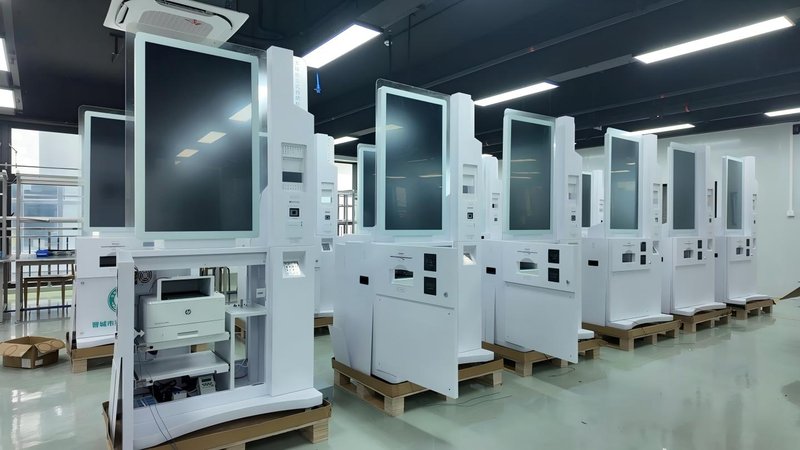
Deploying a high-performance Kiosk Ordering vs QR Code Ordering provides commercial dining and retail venues with an advanced automated workflow. With the digital transformation of the food and beverage (F&B) industry, self-ordering kiosks and mobile QR code ordering have become mainstream ordering solutions. While both reduce manual cashier labor, they differ significantly in user experience, capital expenditure, system management, and operational suitability. Restaurants should evaluate their business models, customer demographics, and venue conditions to select the optimal solution.
Kiosk Ordering vs QR Code Ordering: 1. Advantages and Disadvantages of Self-Ordering Kiosks
Self-ordering kiosks are typically equipped with commercial touchscreens, allowing diners to directly browse menus, customize dishes, and place orders. Depending on the hardware configuration, they can integrate payment modules (credit card EFT-POS, cash acceptors, or QR readers), barcode scanners, and thermal receipt printers.
Their primary advantage is an intuitive, highly visual ordering workflow that does not require diners to use their personal smartphones. Kiosks provide a standardized canvas for high-definition dish photography, combo promotions, and dynamic upsell recommendations. In fast-food chains, food courts, and high-traffic dining establishments, self-ordering kiosks effectively divert counter traffic and relieve front-of-house bottleneck pressure.
However, self-ordering kiosks occupy physical floor or wall space and entail hardware procurement, system integration, preventative maintenance, and daily screen cleaning. If the number of kiosks is insufficient or concentrated in a single bottleneck area, queues can still form during peak dining hours. Furthermore, menu structures and order workflows must seamlessly integrate with the restaurant’s existing POS architecture.
2. Advantages and Disadvantages of Mobile QR Code Ordering
Mobile QR code ordering typically involves table-mounted QR stickers or in-store display codes that link to an online digital menu, allowing customers to browse dishes and submit orders directly from their personal smartphones.
This approach eliminates the need to install dedicated touch hardware at each dining location, offering flexible deployment and effortless cloud-based menu updates. For sit-down, dine-in restaurants centered on tableside ordering, QR code ordering reduces the need for printed physical menus and allows guests to order and re-order at their leisure from their seats.
However, QR code ordering requires guests to have a charged smartphone with stable internet connectivity and an accessible web browser or app. Certain customer segments, particularly elderly patrons, may be unfamiliar with or resistant to ordering via smartphone. If the digital menu loads slowly, local cellular reception is weak, or the navigation hierarchy is cumbersome, the overall dining experience can suffer.
3. Core Differences Between the Two Ordering Channels
Self-ordering kiosks provide dedicated, standalone interactive terminals ideal for centralized ordering, rapid order placement, and eye-catching visual promotions. Mobile QR code ordering leverages personal consumer devices, making it best suited for decentralized, flexible tableside ordering.
From an operational management standpoint, both approaches require continuous menu maintenance, synchronized kitchen order routing, payment reconciliation, and backend POS compatibility. What truly determines operational efficiency is not merely the choice of terminal hardware, but whether the ordering flow is streamlined, kitchen display systems (KDS) receive orders accurately, and high-volume meal peaks can be processed without bottlenecks.
Restaurants must also account for diverse guest preferences. Offering multiple ordering channels is often far more customer-friendly than strictly forcing all patrons onto a single method.
4. How Should Restaurants Choose?
If a restaurant focuses primarily on quick service (QSR), cafeteria-style dining, takeaway, or counter ordering, prioritizing self-ordering kiosks is highly recommended. Kiosks centralize visual menu displays and deliver a standardized, fast-paced transaction flow.
If the establishment operates as a full-service, sit-down restaurant where diners browse dishes at their tables over an extended period, mobile QR code ordering is generally better aligned with operational dynamics.
For high-volume restaurants serving diverse customer demographics, a hybrid model is often the most effective: deploying self-ordering kiosks at the entrance or counter for quick takeaway and walk-up ordering, while offering tabletop QR codes for dine-in guests.
Prior to deployment, restaurant operators should audit existing order workflows, confirm POS integration interfaces, evaluate network infrastructure, plan kiosk physical placement, and establish maintenance protocols to ensure the chosen technology delivers maximum operational value.
Frequently Asked Questions (FAQ)
Q1: Are self-ordering kiosks inherently more efficient than mobile QR code ordering?
Not necessarily. Efficiency depends on diner habits, kiosk quantity, UI design, and kitchen fulfillment speed. Queuing dynamics during peak hours must also be factored into operational planning.
Q2: Can mobile QR code ordering completely replace self-ordering kiosks?
Not in every scenario. Mobile ordering relies entirely on consumer devices and cellular/Wi-Fi connectivity, whereas self-ordering kiosks provide dedicated, reliable public ordering interfaces. Different venue types call for different technology mixes.
Q3: Can self-ordering kiosks connect to an existing restaurant POS system?
Most commercial kiosks can integrate with existing POS systems, but software API compatibility, menu database synchronization, order routing protocols, and payment gateway configurations must be verified in advance.
Q4: Can a restaurant implement both ordering methods simultaneously?
Yes. A hybrid approach offers diners maximum flexibility and accessibility, provided that menu items, pricing, inventory statuses, and promotional discounts remain completely synchronized across all ordering touchpoints. In summary, integrating a reliable Kiosk Ordering vs QR Code Ordering solution reduces operational labor costs, shortens customer wait times, and maximizes store throughput.
Looking for customized Kiosk Ordering vs QR Code Ordering hardware, commercial touchscreen displays, or OEM/ODM self-service solutions? Feel free to contact the ZXTLCD engineering team for free consultations, product specifications, and tailored volume pricing.
Deploying a Self-Service Solution?
To elevate customer experience and streamline ordering or ticketing workflows, explore our AI Self Service Terminal with Large Touchscreen or the versatile Self Service Kiosk for Cinema & Ticketing. For custom hardware integrations, discover our complete line of Custom Self-Service Kiosks or consult our engineering team for sample evaluation.


