The Ultimate Guide to Custom Embedded Industrial Monitors
In the field of industrial monitors, customization plays a decisive role in meeting specific operational requirements. Embedded industrial monitors are compact and versatile, offering great flexibility across industries. In this blog post, we will explore the complete process of customizing embedded industrial monitors—from initial communication to installation and finally delivery.
Mounting Methods for Embedded Industrial Monitors
An important aspect of any custom monitor is its mounting method. Depending on the environment and usage, manufacturers can offer several mounting options:
Panel Mount: Panel mounting is common in industrial environments, allowing the monitor to be installed flush with the surface of a control panel. This provides a clean, streamlined appearance while holding the display firmly in place.
VESA Mount: For applications that require easy movement or flexibility, the VESA mounting option can be used. This method attaches the monitor to an articulated arm or bracket, providing a certain range of movement.
Open-Frame Mount: For embedded solutions where the display must be integrated into existing equipment, open-frame displays are the ideal choice. Their sleek design integrates easily into kiosks, ATMs, and machinery.
The customization of the mounting method depends on the equipment or system into which the display will be embedded.
Pre-Customization Communication: Understanding Customer Needs
Before customization begins, detailed communication with the user is essential to ensure the final product meets business needs. This phase focuses on gathering information about key factors:
1 Application Environment
The operating environment determines how the monitor should be designed. Important considerations include:
Dust and humidity (an IP rating may be required).
Chemical exposure in manufacturing or medical environments.
Vibration or shock resistance when used in heavy industrial machinery.
Outdoor conditions, such as sunlight exposure, requiring anti-glare screens.
2 Operating Temperature
Industrial environments often face extreme temperatures, either intense heat or severe cold. The monitor should offer:
A wide temperature range: suitable for low-temperature storage facilities or the extreme heat near furnaces.
Thermal management solutions, such as built-in fans or advanced materials, to ensure stable performance.
3 Signal Input Compatibility
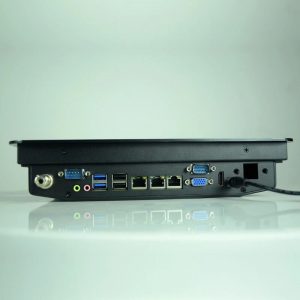
Understanding what inputs the monitor will receive is essential for seamless integration. Different users may require specific connectors, such as HDMI, VGA, DVI, etc.:
Legacy communication standards such as HDMI, VGA, DVI, DisplayPort, or even RS-232 for older systems.
USB and touchscreen integration for highly interactive applications.
4 Display Resolution
The monitor's application determines the required level of resolution. During customization, the following must be discussed:
Common resolutions: such as 1024×768, 1920×1080 (Full HD), or 2560×1440, for displaying highly detailed visual data.
Aspect ratios: Some environments may require unique display formats, such as 16:9 for wide viewing angles, or 4:3 for specific industrial uses.
5 Display Brightness
For monitors used outdoors or in high-glare environments, brightness level is a critical factor. The standard brightness of a display may not be adequate under these conditions, making it necessary to discuss:
Brightness customization: Brightness can range from 300 nits for indoor environments to 1000 nits for outdoor visibility.
Anti-glare and anti-reflective treatments: ensuring maximum visibility in sunlight.
Customization Follow-Up: Ensuring Quality and Customer Satisfaction
Once customization details are finalized, the next step is regular follow-up during the production process. This helps ensure:
Prototypes are developed and approved by the user.
Frequent feedback loops allow design specifications to be adjusted as needed.
Quality inspections confirm the display meets the agreed specifications, including durability testing for harsh environments.
Manufacturers should maintain clear communication with users throughout the production process to address any requirement changes or unexpected challenges.
Customization Delivery: Testing and After-Sales Support
Delivering a custom industrial monitor involves far more than shipping the product. Key aspects to consider include:
Final testing: Temperature, shock, vibration, and other environmental factor tests ensure the monitor works properly under real-world conditions.
Installation support: Some users may need assistance integrating the monitor into existing systems. Providing comprehensive installation guides or on-site assistance ensures a smooth transition.
After-sales support: Ongoing support after delivery is essential, especially for industrial monitors where long-term performance is critical. This includes providing warranty, troubleshooting, and maintenance services.
Conclusion
Custom embedded industrial monitors are essential for industries with unique operational requirements. From understanding the application environment to delivering a fully functional, tested solution, every step of the customization process ensures the display meets the user's exact requirements. By following these steps, manufacturers can deliver reliable, efficient, and durable monitors that stand the test of time in any industrial environment.