

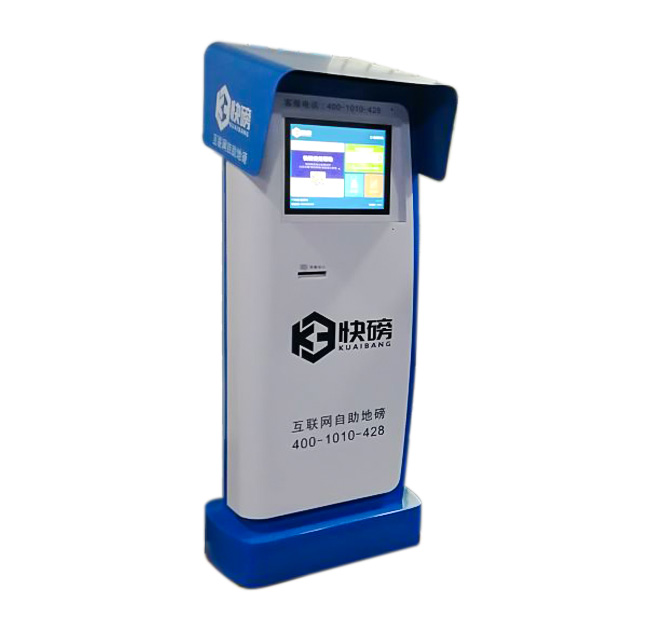
Give Drivers a Clear Process at the Scale
A self-service kiosk machine can provide the user interface for an unattended weighbridge. Drivers can identify a vehicle or job, follow instructions and collect an approved weight ticket without leaving the scale area to find an office. The floor-standing terminal has a display and lower device positions that can accommodate project-specific identification and printing hardware.
Weight accuracy does not come from the kiosk enclosure. The load cells, scale indicator, calibration and legal-for-trade approval belong to the weighbridge system. The terminal connects the driver workflow to that system when the required software and interfaces are supplied by the integrator.
Coordinate Driver, Vehicle and Load Information
A typical process may use an RFID card, QR code, vehicle number, booking reference or supported document. The screen can display instructions such as positioning the vehicle, waiting for a stable reading and moving to the next stage. If inbound and outbound weights are required, the application must match both records before producing a net result.
The self-service kiosk machine can integrate a ticket printer, RFID reader, barcode scanner, intercom, camera or access-control interface. These modules are optional. Their positions should suit drivers using the terminal from the ground or vehicle window, depending on the site layout.
Design for an Industrial Location
Weighbridge terminals may face dust, vibration, temperature changes and extended operating hours. The project must specify environmental protection, heating or cooling and screen visibility. No outdoor IP rating is confirmed on the existing page, so weather resistance should not be assumed without a defined enclosure specification.
Maintenance access should allow paper replacement and peripheral service without exposing sensitive controllers. Vehicle protection barriers, foundations and traffic markings are site responsibilities but should be coordinated with terminal position. Network and power cables need protected routing away from vehicle movement.
Test More Than the Weight Display
Acceptance testing should cover valid and invalid vehicle identification, stable and unstable readings, ticket shortages, repeat weighing and loss of communication with the scale. The self-service kiosk machine should give drivers a safe instruction when automatic processing cannot continue and provide an intercom or assistance route when required.
Industrial buyers should map responsibility across the scale company, automation provider, software developer and kiosk manufacturer. A pilot should use real trucks and drivers to check screen height, glare, traffic direction, intercom volume and ticket collection. If drivers interact from a cab, mounting height and reach differ greatly from a ground-level station.
Send the weighing sequence, scale-controller interface, identification method, printer model, mounting position, environment and daily vehicle volume. ZXTLCD can develop the enclosure around the confirmed workflow. Buyers should also confirm ticket format, duplicate-ticket rules and links between weight records and invoicing or inventory systems.
Coordinate the Kiosk with the Whole Vehicle Lane
A weighbridge terminal cannot be evaluated separately from traffic movement, scale position and driver reach. The site should test the workflow with the actual vehicle types expected to use the lane. Screen height, intercom volume, ticket collection and identification readers may need different positions for cab-level and ground-level interaction. Barriers, signals and road markings should prevent a vehicle from moving before the system completes the measurement. The operator also needs a manual procedure for unstable weight, failed identification and lost communication. Clear division between scale calibration, site software and kiosk maintenance avoids confusion when support is required.
The handover package should include interface documentation, ticket samples, approved device models and a record of the tested weighing sequence. Site teams can then distinguish a kiosk fault from scale, network or vehicle-detection problems and contact the correct service provider.
Lane signage should remain readable in the site’s normal weather and lighting conditions.