

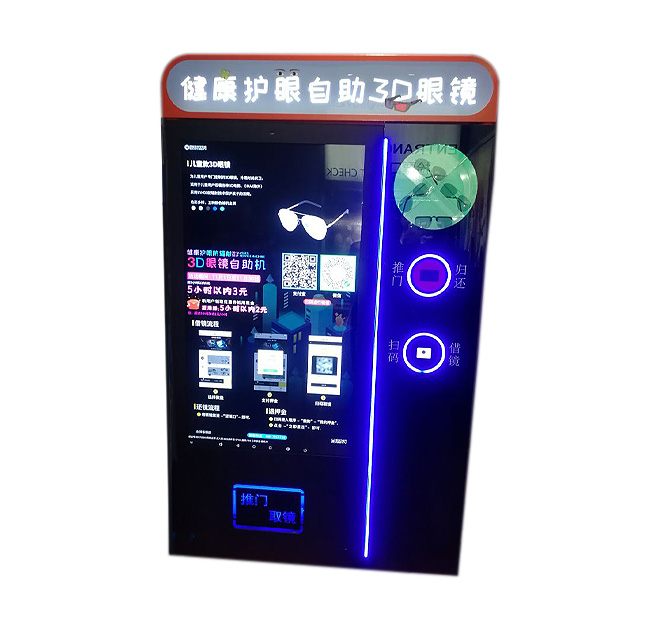
A Guided Starting Point for Immersive Experiences
A customer service kiosk touch screen gives visitors a clear place to begin before they put on 3D glasses or enter a virtual reality experience. Instead of relying on staff to repeat the same introduction throughout the day, the terminal can present instructions, safety notices, language selection and experience choices in a consistent sequence. This makes it useful for museums, science centers, gaming venues, shopping malls and exhibition booths where visitors need guidance before interacting with immersive content.
The product uses a multi-position experience structure rather than a conventional restaurant ordering terminal. Its design can support several users or viewing stations in one organized area. The exact screen size, computer platform and accessory layout should be confirmed for each project, but the enclosure can be planned around the intended visitor flow and the hardware required by the content provider.
Reduce Confusion Before the Headset Goes On
Immersive attractions often lose time when users do not know how to select a program, adjust glasses or start the next stage. A customer service kiosk touch screen can divide that process into short, visual steps. The interface may introduce the experience, explain age or height restrictions, show hygiene instructions and direct the visitor to the correct station. For international venues, a multilingual start screen can reduce dependence on printed signs.
The display can also be used for trailers, branded animation, educational introductions or waiting-time information. Because the content is digital, operators can update instructions when an exhibit changes without replacing physical boards. This is particularly valuable for touring exhibitions and seasonal entertainment projects.
Hardware Integration Based on the Experience
This kiosk should be specified as part of a complete project rather than treated as a generic screen. The integrator should confirm the number of user positions, available floor space, network requirements and the connection method for the 3D or VR system. Depending on the software and operating environment, optional integration may include a PC, camera, QR scanner, ticket reader, speakers, headset storage or peripheral control. These functions should only be selected when they are supported by the final application.
The enclosure layout can be adapted for branding and venue coordination. Color, printed graphics, header signage and interface design can help the terminal look like part of the attraction rather than an unrelated machine placed nearby. Cable routing and service access should also be discussed early, especially when multiple glasses or viewing devices are connected.
Content planning should be included in acceptance testing. Operators can check whether the first-time visitor understands the instructions without staff assistance, whether the selected language remains active through the session and whether videos load quickly enough for continuous public use. A short pilot at the real venue can reveal problems with audio level, reflections and queuing that are difficult to judge from factory drawings alone.
Suitable Deployment Environments
A customer service kiosk touch screen of this type can be used at VR arcades, museum exhibits, brand experience centers, educational laboratories, theme parks and event activations. It can support ticket validation, guided onboarding or content selection, depending on the installed software. For unattended use, the project team should also consider cleaning routines, supervision requirements and the durability of frequently handled accessories.
ZXTLCD can build the enclosure and display configuration around the required experience. Send the intended application, number of users, installation space, software platform and required peripherals so the physical layout can be evaluated before production.
For purchasing teams, the quotation should separate the enclosure, display, computing hardware and optional peripherals. This makes later maintenance easier because replacements can be matched to the approved component list. Buyers should also confirm packaging, installation responsibility, spare-parts expectations and the acceptance test before ordering multiple units. These details help distributors and venue operators compare proposals on the complete operating requirement instead of judging the project only by screen size or cabinet appearance.