

Give Information Applications a Dedicated Screen
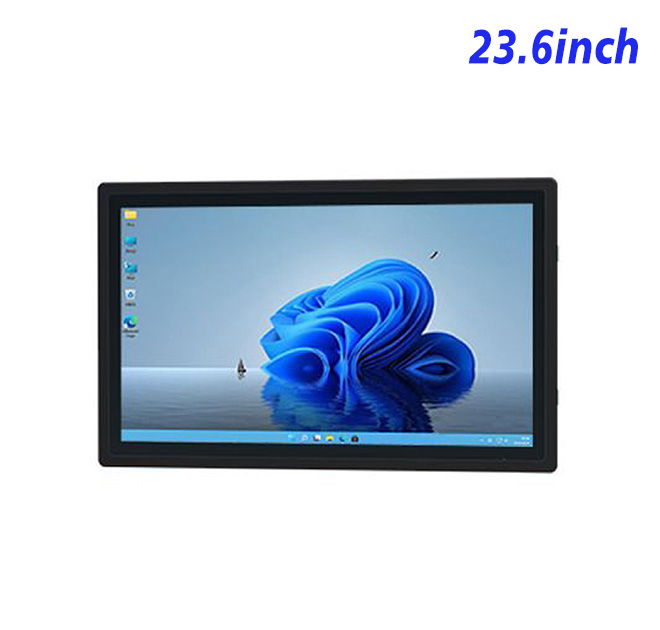
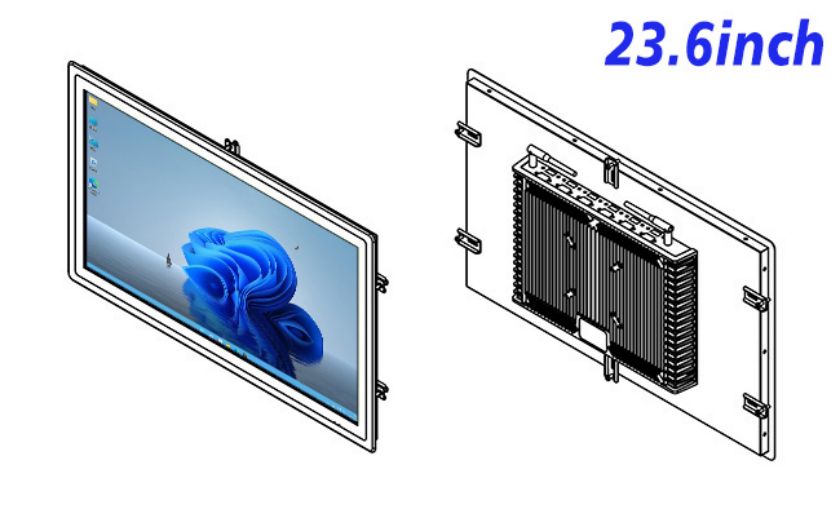
The information kiosk is a 23.6-inch embedded Windows display and computing platform suitable for an information kiosk, showroom fixture or industrial information point. Its existing specification lists Full HD 1920 × 1080 resolution, a 16:9 aspect ratio and a 522 × 294 mm active display area. This format can present maps, directories, product information or operational dashboards with clearer visual separation than a compact tablet.
The product remains an integration component. The finished enclosure, application, network connection and optional peripherals are selected by the project owner. That distinction allows OEM buyers to build a system around their own branding and workflow rather than adapting a preconfigured retail terminal.
| Embedded Industrial All-in-One Computer Specifications for External Install 23.6 Inch | ||||
| LCD Panel Parameters | Screen Size | 23.6 Inch | ||
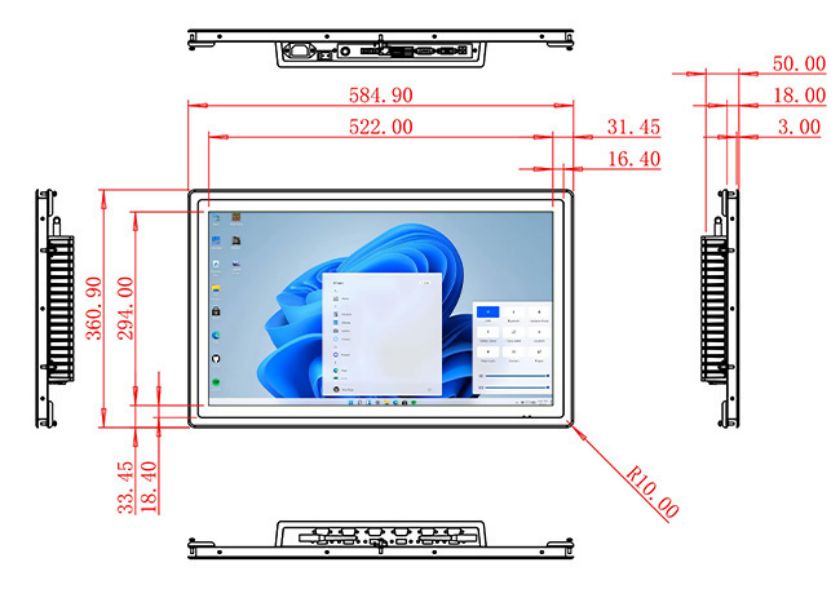
| Display Area | 522 mm.(Height) X 294(Width)mm. | |||
| Aspect Ratio | 16 : 9 | |||
| LCD Type | a-Si TFT-LCD Monitor | |||
| Maximum Resolution | 1920 X 1080 | |||
| Display Color | 16.7m , 72% NTSC | |||
| Brightness | 250cd/m² | |||
| Contrast Ratio | 1000 : 1 | |||
| Viewing Angle (Up/Down/Left/Right) | 89°/89°/89°/89° (Type)(CR≥10) | |||
| Response Time | 14ms | |||
| LCD Panel Lifespan (Hours) | 60,000(Hour.) | |||
| Field Frequency | 100Hertz | |||
| Audio parameters | Audio system | Stereo | ||
| Speaker size | ≈ 99 x 45 x 20 mm | |||
| Impedance | 8 Ohm | |||
| Power | 2 x 5 Watt | |||
| Loudness | > 80 Decibel | |||
| Interface | 4-pin connector | |||
| Internal computer configuration (Choose one of two) |
CPU | Intel i5-4310M Generation 4, Dual-Core Four Threads, Main frequency can reach up to 2.7GHz | Intel I5-6100T Generation 6, Dual-Core Four Threads, Main frequency can reach up to 3.2GHz | |
| Graphics Card | Integrated Graphics Card Intel® HD 4600 | Integrated Graphics Card Intel® HD 530 | ||
| RAM | 4GB | 8GB | ||
| Storage Memory Capacity | 128GB | 256GB | ||
| OS | Win10 or win11 Optional | Win10 or win11 Optional | ||
| Wi-Fi Built-in | Speed 150Mbps 802.11n wifi Integrated | Speed 150Mbps 802.11n wifi Integrated | ||
| Media Format | Video Format | wmv, avi, flv, rm, rmvb, mpeg, ts, mp4 etc. | ||
| Audio Format | MP3, WMA | |||
| Photo Format | BMP, JPEG, PNG, GIF etc. | |||
| Onboard Interface | Network port | RJ45 X 1, 10M/100M Adjustable Ethernet | ||
| HDMI | 1 | |||
| USB | 4 | |||
| Power | Power Supply | Alternating Current 100V~240V, 50/60Hz | ||
| Maximum Power Loss | ≤ 45 Watt | |||
| Standby Mode Power Loss | < 1 Watt | |||
| Features | Operating Temperature | 0℃ ~ 50℃ | ||
| Storage Temperature | Below 10℃ ~ +60℃ | |||
| Package Size | Device Dimensions | 584.9 X 360.9 X 50 mm. | ||
| Net Weight | 8 Kilogram | |||
| Package Size | 56 X 45 X 15Centimeter | |||
| Gross Package Weight per Unit | 9 Kilogram | |||
Organize Content for Short Public Sessions
Visitors approach an information kiosk with a specific question and limited patience. The home screen should prioritize a small number of destinations, use familiar labels and provide a visible return path. Long documents are better divided into short pages or searchable topics. If the deployment includes maps, the location of the kiosk should be clearly marked so directions begin from the correct point.
Screen content also needs to work for different heights and viewing angles. The listed wide viewing angles support shared viewing, but text size and contrast should still be tested inside the actual cabinet. Front glass, overhead lighting and nearby windows can affect legibility.
Size the Windows Platform for Real Content
The product specification provides alternative Intel processor, memory and storage configurations. A directory application may need modest local resources, while 3D product content, multiple videos or a locally hosted database may need more. Buyers should submit the application requirements, Windows version and update policy so the computing configuration can be reviewed before ordering.
Connectivity planning should identify the network type, required ports and any remote-management agent. If touch is required, the touch interface and driver support must be confirmed for the selected build. A sample should run the final software for long enough to expose startup, recovery or performance problems.
Design the Cabinet for Maintenance
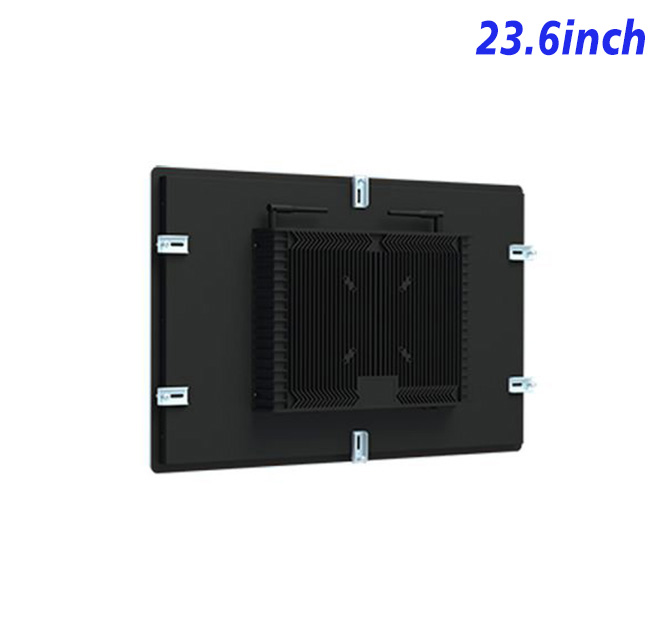
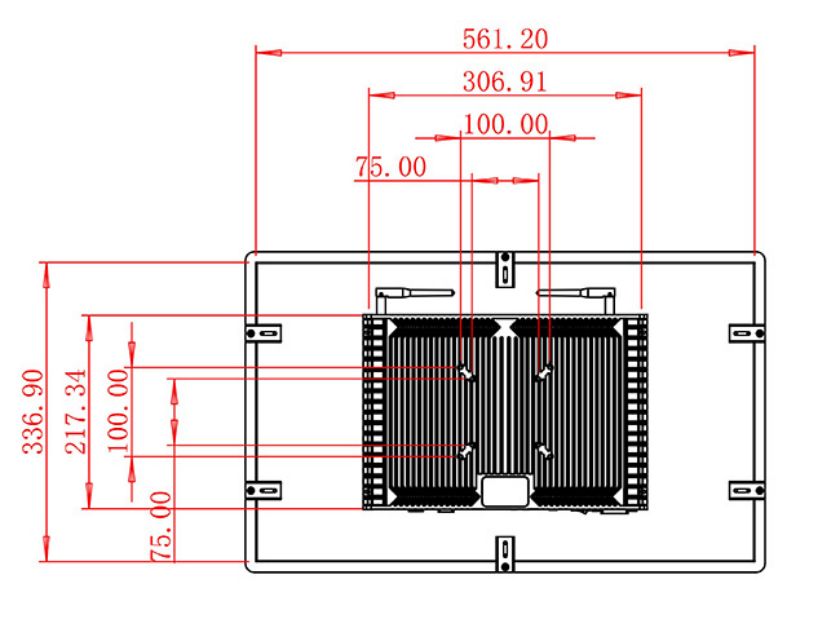
The open-frame structure needs a coordinated cutout, mounting method and rear service area. The display should be removable without damaging the front finish or disconnecting unrelated equipment. Ventilation must consider heat from the panel, computer and any additional hardware inside the same enclosure.
Although the original title references waterproof use, the precise protection boundary should be documented. The buyer should state whether the unit will be indoors, in a sheltered public area or inside equipment exposed to cleaning and dust. The complete cabinet, not the panel name alone, determines environmental suitability.
Move from Sample to Rollout
An acceptance checklist can cover resolution, color consistency, touch accuracy where fitted, network recovery, application lockdown and mechanical fit. An approved sample and controlled drawing reduce variations between batches. Multi-location buyers can also plan spare equipment, packaging and installation documentation.
Content ownership should be settled before deployment. The customer needs a method for approving directory changes, publishing updates and returning a terminal to a known state after a software fault. If different organizations manage the hardware and application, the support plan should explain which team receives the first incident report and what diagnostic information is required.
Branch staff should receive a short operating guide covering startup checks, cleaning, fault reporting and the approved support contact.
This supports consistency.
Share the content type, software image, cabinet drawing, site conditions and quantity with ZXT LCD. The team can review the information kiosk as the display platform for an information kiosk and provide a configuration-based quotation. Distributors and solution partners can discuss samples and phased supply.
If you would like to get the specification about above product, or you hope to discuss your requirements or need any additional information on our this product , then please do not hesitate to send us a inquiry and contact our sales team now.