

Start with a Flexible Windows Core
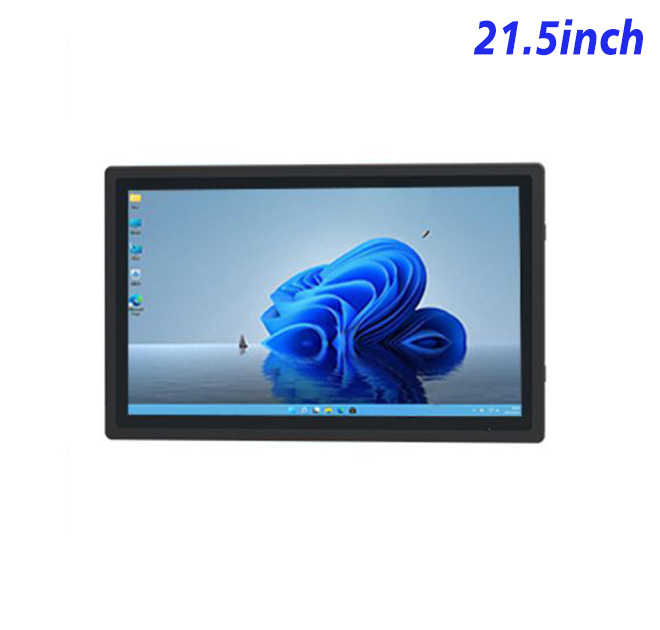
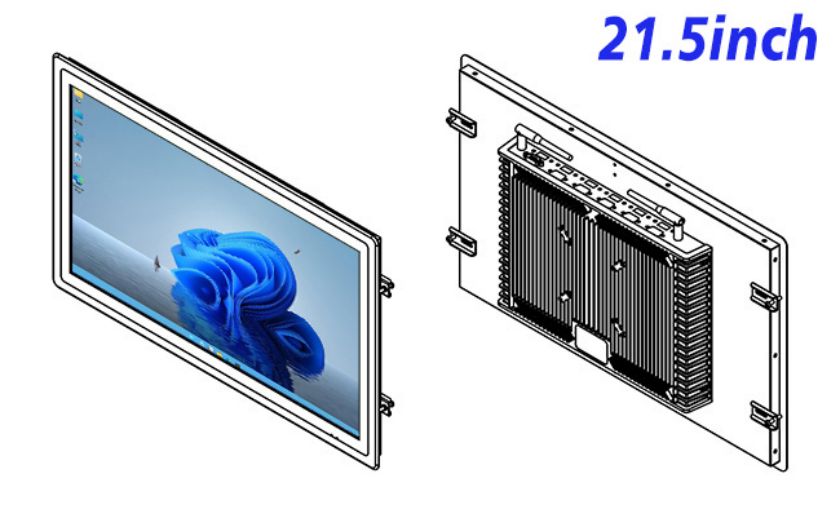
The Customized self-service kiosk provides a 21.5-inch embedded display and Windows computing base for a Customized self-service kiosk. Its published panel specification includes 1920 × 1080 resolution, a 16:9 aspect ratio, 16.7 million colors and a 476.5 × 268 mm active display area. This size is large enough for guided workflows and product content while remaining manageable for counters, wall fixtures and compact floorstanding cabinets.
Customization begins with requirements, not decorative changes. The buyer should define the application, user group, installation location and connected hardware before the enclosure is finalized. The panel does not include every scanner, printer or payment device implied by a finished kiosk concept.
| Specifications of 21.5-Inch External Embedded Industrial All-in-One Computer with Windows | ||||
| LCD Panel Parameters | Screen Size | 21.5 Inch | ||
| Display Area | 476.5 mm (Height) X 268 mm (Width) | |||
| Aspect Ratio | 16 : 9 | |||
| LCD Type | TFT-LCD Monitor | |||
| Maximum Resolution | 1920 X 1080 | |||
| Display Color | 16.7m | |||
| Brightness | 250cd/m² | |||
| Contrast Ratio | 3000 : 1 | |||
| Viewing Angle (Up/Down/Left/Right) | 89/89/89/89 (Type)(CR≥10) | |||
| Response Time | 6.5ms | |||
| LCD Panel Lifespan (Hours) | 60,000(Hour.) | |||
| Field Frequency | 60Hertz | |||
| Audio parameters | Audio system | Stereo | ||
| Speaker size | ≈ 99 x 45 x 20 mm | |||
| Impedance | 8 Ohm | |||
| Power | 2 x 5 Watt | |||
| Loudness | > 80 Decibel | |||
| Interface | 4-pin connector | |||
| Internal computer configuration (Choose one of two) |
CPU | Intel i5-4310M Generation 4, Dual-Core Four Threads, Main frequency can reach up to 2.7GHz | Intel I5-6100T Generation 6, Dual-Core Four Threads, Main frequency can reach up to 3.2GHz | |
| Graphics Card | Integrated Graphics Card Intel® HD 4600 | Integrated Graphics Card Intel® HD 530 | ||
| RAM | 4GB | 8GB | ||
| Storage Memory Capacity | 128GB | 256GB | ||
| OS | Win10 or win11 Optional | Win10 or win11 Optional | ||
| Wi-Fi Built-in | Speed 150Mbps 802.11n wifi Integrated | Speed 150Mbps 802.11n wifi Integrated | ||
| Media Format | Video Format | wmv, avi, flv, rm, rmvb, mpeg, ts, mp4 etc. | ||
| Audio Format | MP3, WMA | |||
| Photo Format | BMP, JPEG, PNG, GIF etc. | |||
| Onboard Interface | Network port | RJ45 X 1, 10M/100M Adjustable Ethernet | ||
| HDMI | 1 | |||
| USB | 4 | |||
| Power | Power Supply | Alternating Current 100V~240V, 50/60Hz | ||
| Maximum Power Loss | ≤ 45 Watt | |||
| Standby Mode Power Loss | < 1 Watt | |||
| Features | Operating Temperature | 0℃ ~ 50℃ | ||
| Storage Temperature | Below 10℃ ~ +60℃ | |||
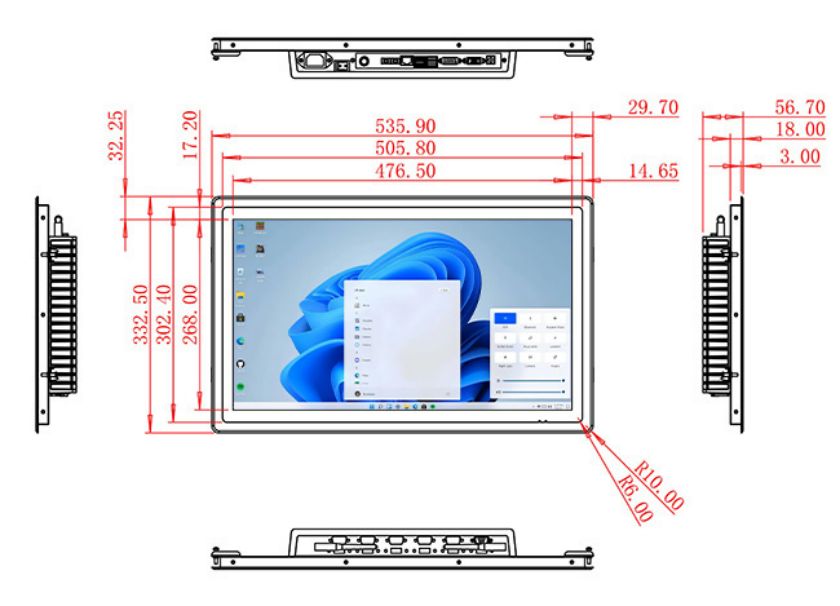
| Package Size | Device Dimensions | 535.9 X 332.5 X 56.7 mm. | ||
| Net Weight | 7 Kilogram | |||
| Package Size | 62 X 42 X 15Centimeter | |||
| Gross Package Weight per Unit | 7.5 Kilogram | |||
Use the Screen Around a Specific Task
A Customized self-service kiosk may support visitor guidance, telecom service, internal check-in, product discovery or industrial information. Each use case needs a different home screen and session length. A public directory favors large choices and fast navigation; an internal application may show more detailed data to trained staff.
The 21.5-inch format allows the interface to combine primary actions with instructions or status information. Designers should resist filling the screen simply because space is available. The final application should be tested at the installed height and under the lighting expected at the site.
Configure Processing and Storage Deliberately
Alternative Intel processor, memory and storage options are listed on the existing page. The software provider should give minimum and recommended requirements, including the Windows version, browser engine, local media and background services. This allows the hardware configuration to support the real workload without unnecessary upgrades.
The interface schedule should identify network connections, USB devices, audio and touch requirements. If the system needs a specialized peripheral, the integrator should confirm its Windows driver and power needs during sample testing. Application recovery after a power or network interruption should form part of acceptance.
Keep Mechanical Customization Serviceable
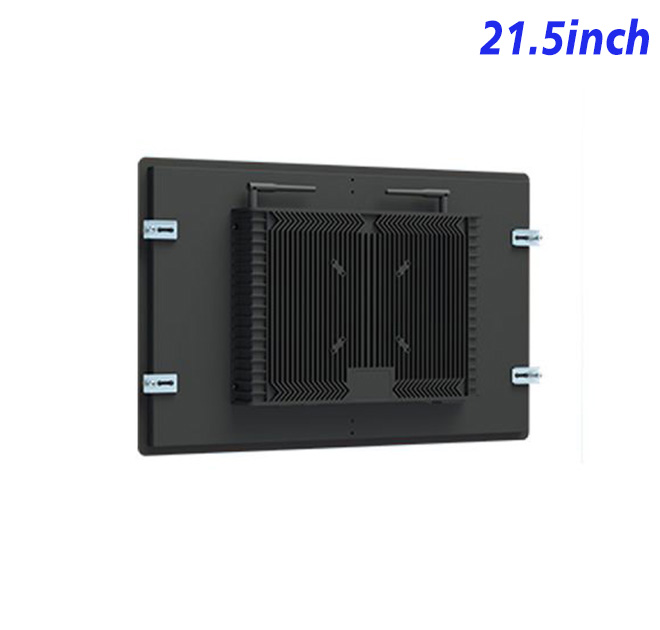
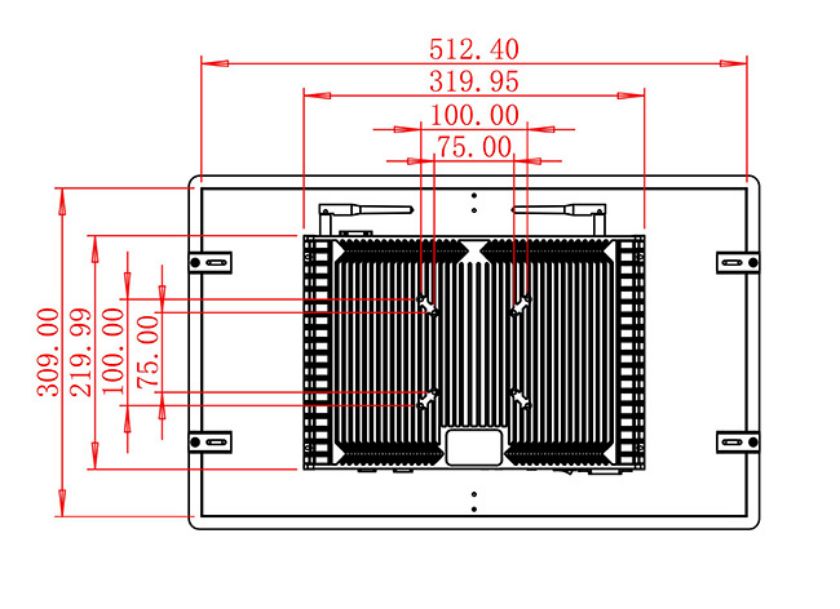
Open-frame integration requires accurate drawings. The visible opening, mounting hardware, rear clearance, airflow and cable strain relief should be reviewed together. Branding panels and decorative glass should not prevent technicians from replacing the display or reaching connectors.
Site conditions also influence the design. The buyer should state temperature, humidity, dust, cleaning and operating-hour expectations. Environmental ratings should be based on documented configuration and the finished enclosure, not assumed from the word industrial.
Approve a Reference Unit
A first article can verify fit, display quality, touch behavior where fitted and software compatibility. Once approved, its drawing revision and option list provide a baseline for production. Distributors can use the same reference to coordinate localized branding, packaging and installation documentation.
Commercial planning should cover more than the unit price. Buyers can compare the cost of cabinet fabrication, application licensing, installation, spares and field replacement over the expected project life. A clear bill of configuration makes those comparisons possible and prevents optional accessories from appearing unexpectedly after the prototype has already been approved.
For multi-country programs, the integrator should confirm power, language, operating-system and regulatory requirements for each destination. One mechanical design may still need different cables, labels or software images. Separating these regional items from the common hardware platform makes forecasting and production scheduling easier.
Each destination can then approve its localized software and labels without changing the common mechanical reference used by the factory.
Share the enclosure concept, workflow, Windows application, interface requirements and volume forecast with ZXT LCD. The team can review the Customized self-service kiosk for a Customized self-service kiosk and quote the confirmed display, computing and touch options. OEM buyers can also discuss samples and phased orders before a larger rollout.
If you would like to get the specification about above product, or you hope to discuss your requirements or need any additional information on our this product , then please do not hesitate to send us a inquiry and contact our sales team now.