

A Counter Screen Designed around the Order Conversation
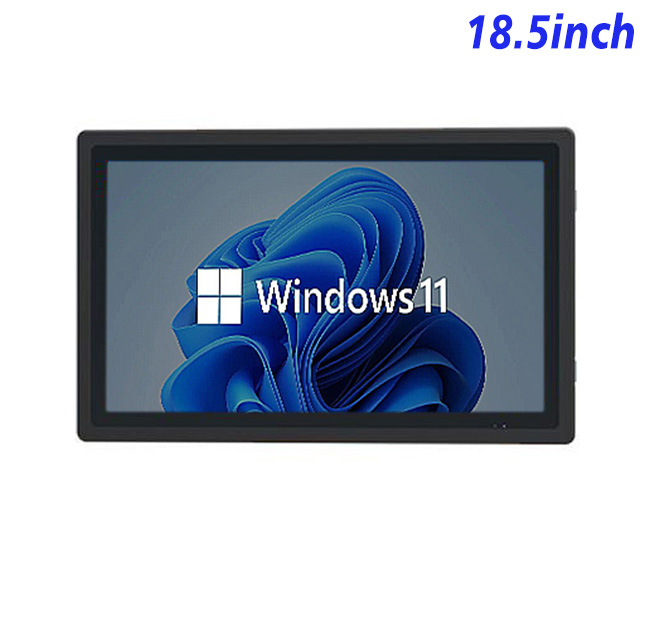
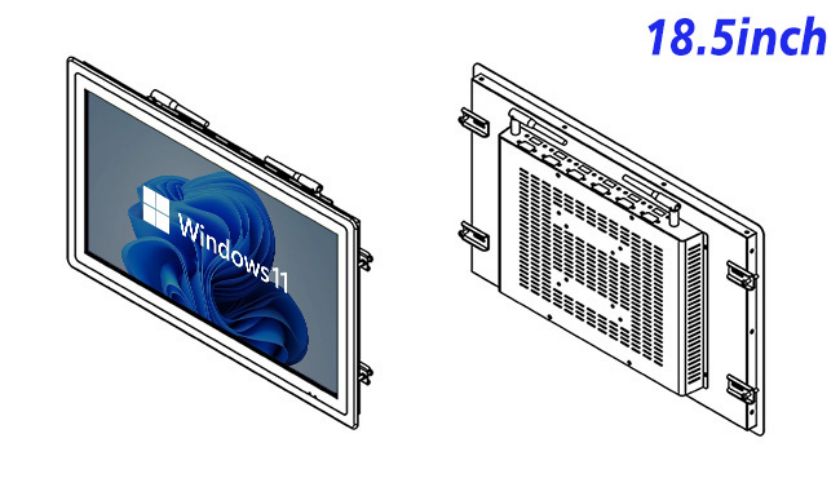
A restaurant kiosk system creates value when it supports the exact moment an order is entered, clarified or handed to the next team. For counter ordering and order-status management, this 18.5-inch embedded Windows unit places the application close to daily work without requiring a separate desktop computer.
Counter staff can review the active menu, enter special instructions and monitor order progress from one embedded Windows station while certified payment hardware remains separately integrated. The Full HD canvas can keep product groups, modifiers and the current basket visible without turning every choice into a separate page.
That operating angle should guide the page layout, mounting height and staff permissions. Buyers can map who starts the order, who confirms exceptions and who closes the handoff, then configure the screen around those decisions. This turns the hardware into a purposeful service station instead of another display that staff must work around.
Full HD Space for Menu and Basket Information
The 18.5-inch LCD is specified at 1920 × 1080 resolution, 250 cd/m² brightness and 1200:1 contrast. The embedded computer can use one of the listed Intel processor options with 4 GB or 8 GB RAM and 128 GB or 256 GB storage. Windows 10 or Windows 11 is listed as optional. RJ45, HDMI and four USB connections support system integration, while maximum power consumption is listed at 30 W. The selected combination must be recorded with the approved sample.
These specifications describe an indoor embedded platform, not a finished freestanding kiosk. Menu software, enclosure design, certified payment, customer data and connected peripherals remain project responsibilities.
| Embedded Windows All-in-One Computer Specifications 18.5 Inch | ||||
| LCD Panel Parameters | Screen Size | 18.5 Inch | ||
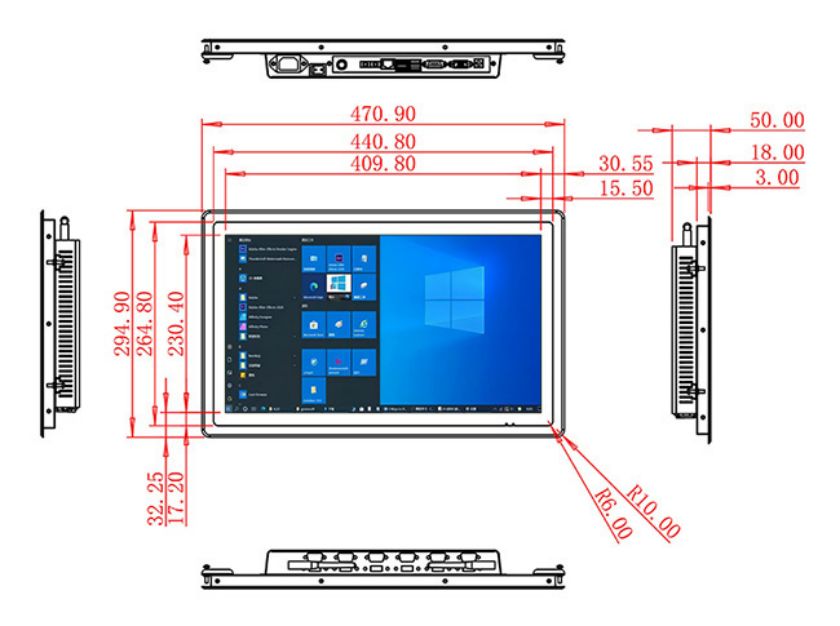
| Display Area | 409.8 mm.(Height) X 230.4(Width)mm. | |||
| Aspect Ratio | 16 : 9 | |||
| LCD Type | a-Si TFT-LCD Monitor | |||
| Maximum Resolution | 1920 X 1080 | |||
| Display Color | 16.7m , 72% NTSC | |||
| Brightness | 250cd/m² | |||
| Contrast Ratio | 1200 : 1 | |||
| Viewing Angle (Up/Down/Left/Right) | 89°/89°/89°/89° (Type)(CR≥10) | |||
| Response Time | 14ms | |||
| LCD Panel Lifespan (Hours) | 60,000(Hour.) | |||
| Field Frequency | 60Hertz | |||
| Audio parameters | Audio system | Stereo | ||
| Speaker size | ≈ 99 x 45 x 20 mm | |||
| Impedance | 8 Ohm | |||
| Power | 2 x 5 Watt | |||
| Loudness | > 80 Decibel | |||
| Interface | 4-pin connector | |||
| Internal computer configuration (Choose one of two) |
CPU | Intel i5-4310M Generation 4, Dual-Core Four Threads, Main frequency can reach up to 2.7GHz | Intel I5-6100T Generation 6, Dual-Core Four Threads, Main frequency can reach up to 3.2GHz | |
| Graphics Card | Integrated Graphics Card Intel® HD 4600 | Integrated Graphics Card Intel® HD 530 | ||
| RAM | 4GB | 8GB | ||
| Storage Memory Capacity | 128GB | 256GB | ||
| OS | Win10 or win11 Optional | Win10 or win11 Optional | ||
| Wi-Fi Built-in | Speed 150Mbps 802.11n wifi Integrated | Speed 150Mbps 802.11n wifi Integrated | ||
| Media Format | Video Format | wmv, avi, flv, rm, rmvb, mpeg, ts, mp4 etc. | ||
| Audio Format | MP3, WMA | |||
| Photo Format | BMP, JPEG, PNG, GIF etc. | |||
| Onboard Interface | Network port | RJ45 X 1, 10M/100M Adjustable Ethernet | ||
| HDMI | 1 | |||
| USB | 4 | |||
| Power | Power Supply | Alternating Current 100V~240V, 50/60Hz | ||
| Maximum Power Loss | ≤ 30 Watt | |||
| Standby Mode Power Loss | < 1 Watt | |||
| Features | Operating Temperature | 0℃ ~ 50℃ | ||
| Storage Temperature | Below 10℃ ~ +60℃ | |||
| Package Size | Device Dimensions | 470.9 X 294.9 X 50mm | ||
| Net Weight | 6.5 Kilogram | |||
| Package Size | 55 X 38 X 15Centimeter | |||
| Gross Package Weight per Unit | 7 Kilogram | |||
The Computing Configuration behind the Workflow
Application and Windows Image
The software provider should define processor load, memory demand, storage growth, startup behavior and Windows update policy before hardware approval. A short menu application and a database-connected multi-location platform can place very different demands on the same display size.
Counter Peripherals
No touch layer is listed in the specification, so the intended keyboard, mouse, scanner or other input device must be confirmed. The intended operator, standing distance and workflow should be tested with the selected input hardware rather than inferred from the word kiosk.
Keep Payment and Ordering Responsibilities Clear
Cable and Service Access
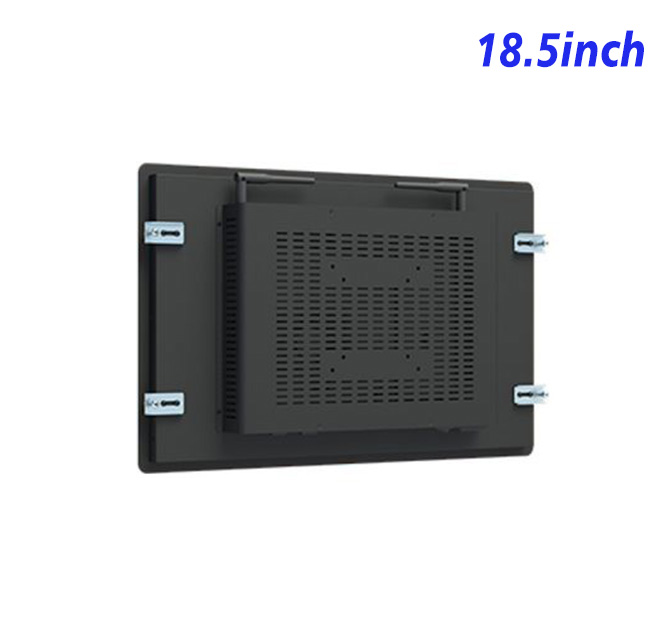
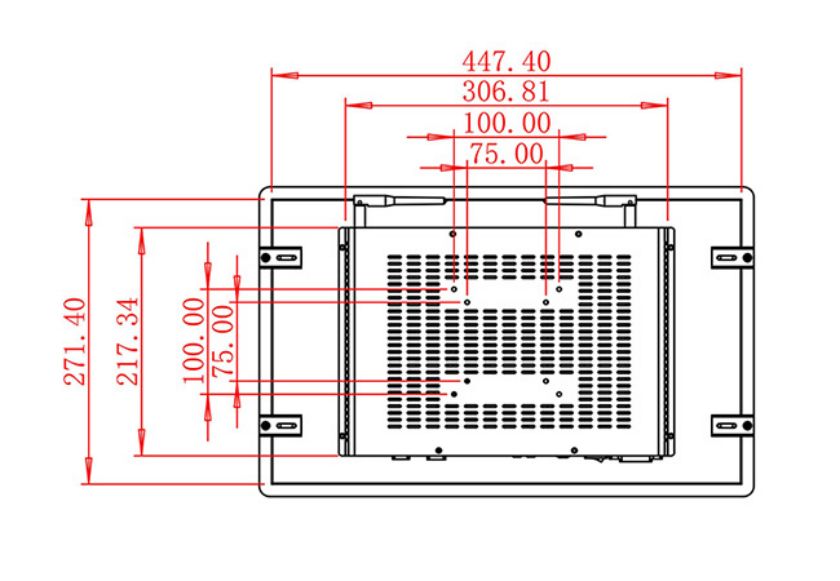
Cabinet drawings should identify the front opening, mounting points, rear clearance, ventilation, power connection, network route and cable strain relief. Printers, scanners and payment modules should remain serviceable without removing the Windows assembly.
The interface must also explain network loss, unavailable menu items and interrupted orders. Clear recovery messages help staff restore service instead of restarting equipment without understanding the cause.
Pilot the Counter before Replicating It
The first restaurant kiosk system installation should use realistic menus, modifiers, long product names and peak-period order volumes. Teams can measure entry time, corrections, abandoned steps and staff intervention before repeating the design.
Procurement records should identify the panel option, processor, RAM, storage, Windows version, connectors, input method and packing. This protects the approved result when a later order is placed under a shortened commercial name.
Configuration Records for Restaurant Rollouts
ZXTLCD reviews application workload, drawings, quantity, installation environment and peripheral requirements before production. This project review gives distributors and restaurant-technology integrators a practical hardware reference while keeping software and complete-system responsibilities clear.
After handover, teams need the approved software image, wiring reference, administrator ownership and replacement process. Those records help the restaurant kiosk system remain supportable when menus change, locations expand or the original installer is no longer on site.
Commercial approval should cover more than appearance. A signed configuration sheet, application test record and installation drawing give the buyer, software partner and hardware supplier the same reference. That shared baseline reduces ambiguity during production, commissioning and later replacement, especially when several restaurant locations are delivered on different schedules.