

Keep the Current Procedure at the Service Point
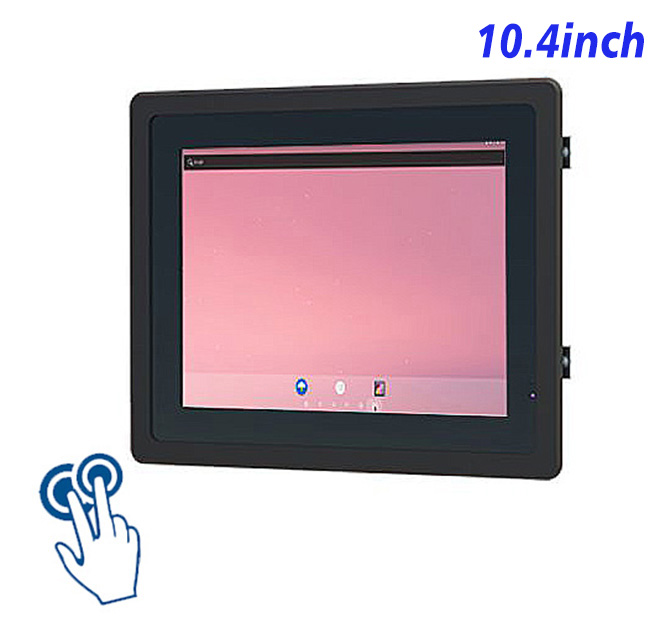
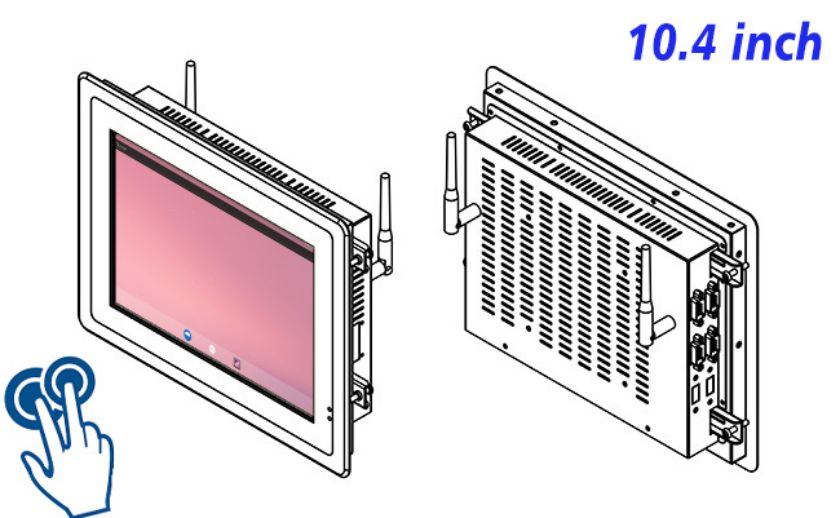
The available opening, user task and software load should define the hardware choice. For indoor maintenance instruction stations, this 10.4-inch Android HMI computer can display service procedures, component references and completion records near maintained equipment. Its value comes from supporting compact procedural guidance with controlled access, not from adding unrelated kiosk claims.
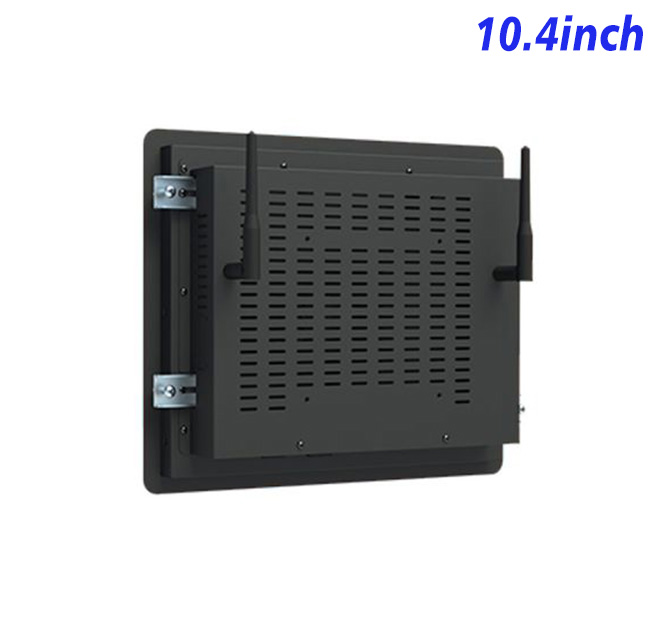
The display, capacitive touch layer and computing board share one compact mechanical platform. That reduces separate boxes inside the customer’s fixture. The project still needs approved wiring, airflow, mounting clearances and peripheral ownership. Screen layout should be tested at the real viewing distance with the people who will use it.
Use the Small Screen for Steps rather than Dashboards
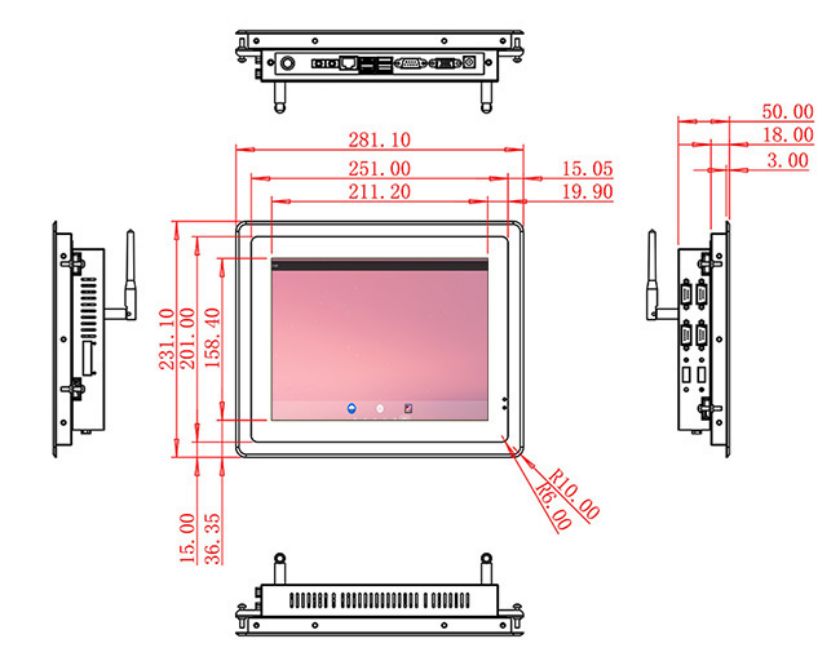
The documented 10.4-inch LCD provides 800 × 600 resolution, 400 cd/m² brightness and 700:1 contrast. It uses a 10-point projected-capacitive touch layer with USB interface, 3 mm strengthened cover glass, more than 85% transmission, less than 6 ms response and stated touch accuracy. The computing configuration lists RK3288 with 2 GB RAM, 32 GB storage and Android 10.0. Available connections include Gigabit Ethernet, dual USB 2.0, 2.4 GHz Wi-Fi and Bluetooth 4.2. Maximum power consumption is 15 W, while the listed device dimensions are 281.1 × 231.1 × 50 mm. These values must remain tied to the approved configuration because options shown in the same table are not automatically combined.
The numbers describe the base hardware rather than a finished business system. Application performance depends on the selected Android board, memory, storage, operating-system build, network design and connected equipment. Procurement documents should repeat the approved option set instead of copying every alternative from the specification table.
| Specifications of 10.4-Inch Capacitive Touch System Android All-in-One Computer | |||
| LCD Panel Parameters | Screen Size | 10.4 Inch | |
| Display Area | 211.2 mm.(Height) X 158.4(Width)mm. | ||
| Aspect Ratio | 16 : 9 | ||
| LCD Type | a-Si TFT-LCD Monitor | ||
| Maximum Resolution | 800 X 600 | ||
| Display Color | 16.7M | ||
| Brightness | 400cd/m² | ||
| Contrast Ratio | 700 : 1 | ||
| Viewing Angle (Up/Down/Left/Right) | 80°/80°/70°/70° (Type)(CR≥10) | ||
| Response Time | 30Miss | ||
| LCD Panel Lifespan (Hours) | 60,000(Hour.) | ||
| Field Frequency | 60Hertz | ||
| PCAP Touchscreen Panel Parameters | Touch Pattern | Capacitive Touchscreen Capacitive Projected | |
| Touch Points | 10 Points | ||
| Cover Glass | Morse Glass Size 7 Physically reinforced to prevent explosion | ||
| Glass 3 mm. Optical mount to reduce parallax | |||
| Glass Transmission | >85% (Higher light transmission depends on glass coating technology For example AR/AG) >85% | ||
| Response Speed | < 6Miss | ||
| Touch Accuracy | More than 90% of the touch area ±2 mm | ||
| Touch Method | Inch Stylus | ||
| Output Format | Coordinate Output | ||
| Click Time | Unlimited | ||
| Smallest Touch Size | 5 mm | ||
| Long-lasting Durability | Yes, Available | ||
| Touch Interface | USB | ||
| Operating Temperature and Humidity | Below 10℃ ~ +50℃, ≤ 85%RH | ||
| Storage Temperature and Humidity | Less than 20℃ ~ +60℃, ≤ 90%RH | ||
| Audio parameters | Audio system | Stereo | |
| Speaker size | ≈ 99 x 45 x 20 mm | ||
| Impedance | 8 Ohm | ||
| Power | 2 x 5 Watt | ||
| Loudness | > 80 Decibel | ||
| Interface | 4-pin connector | ||
| Built-in Android PCB Configuration (Choose one of two) | CPU | Quad-Core RK3288, 1.8GHz | |
| GPU | Mali-T764 | ||
| RAM | 2GB | ||
| ROM | 32GB | ||
| Android System | Android 10.0 | ||
| Ethernet | 1 x RJ45, 1,000 Mbps | ||
| Wireless Internet | 2.4Gigahertz | ||
| Bluetooth | 4.2 | ||
| Interface | USB2.0 x 2 | ||
| Power | Power Supply | Alternating Current 100V~240V, 50/60Hz | |
| Maximum Power Loss | ≤ 15 Watt | ||
| Standby Mode Power Loss | < 1 Watt | ||
| Features | Operating Temperature | 0℃ ~ 50℃ | |
| Storage Temperature | Below 10℃ ~ +60℃ | ||
| Package Size | Device Dimensions | 281.1 X 231.1 X 50 mm. | |
| Net Weight | 2 Kilogram | ||
| Package Size | 33.5 X 18.5 X 15 Centimeter | ||
| Gross Package Weight per Unit | 2.5 Kilogram | ||
Stabilize Android before Field Installation
Procedure owner
A stable deployment begins with one controlled operating-system image. The project team should define automatic launch, user permissions, update policy, local cache, restart behavior and recovery after power loss. Open administrator access and undocumented changes create avoidable support work.
Technician access
The terminal must not bypass lockout procedures, authorize maintenance or replace a safety controller. Product title, sales copy, drawings, software scope and bill of materials should describe the same finished capability. This protects both the buyer and integrator from assuming that an application, certification or peripheral is included when it is not.
Protect the Boundary between Guidance and Control
Machine boundary
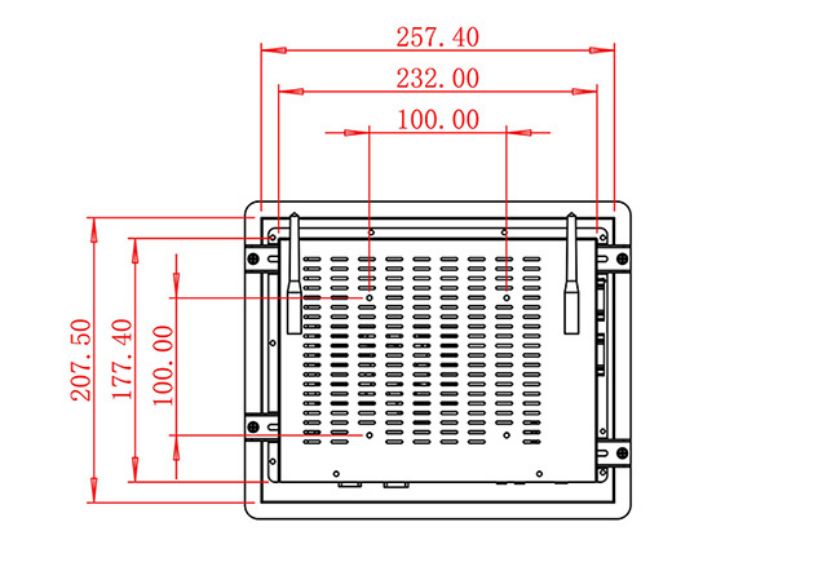
Mechanical integration drawings should identify the front opening, fixing points, rear depth, ventilation path, power route, network cable, connector access and removal clearance. A scanner, printer, reader, camera or payment module should be documented and serviced independently instead of becoming inaccessible behind the panel.
Touch interaction also needs realistic testing. Long labels, multilingual content, invalid entries, unavailable records and interrupted connections reveal more than a perfect demonstration. Buttons, warning states and confirmation steps should remain readable without requiring users to understand the internal system.
Verify Recovery after Interrupted Work
The first Android HMI computer should be treated as an engineering sample. Acceptance can record boot time, application launch, touch alignment, network reconnection, peripheral communication and recovery after an unexpected shutdown. The team should also confirm that no product model appears in customer-facing marketing text.
A representative workflow should run from the opening screen to the final confirmation or exception. Measure task time, repeated touches, staff assistance and recovery steps. Findings can be corrected in the software image or fixture before volume production, when changes remain inexpensive.
Record the Service Configuration
ZXTLCD can review the screen option, computing load, touch workflow, mounting drawing, peripherals, quantity and operating conditions before production. For repeat Android HMI computer projects, the approved sample record helps purchasing, engineering and after-sales teams keep the panel, touch layer, computing board and storage, connectors and mechanics consistent.
Handover records should include the final operating-system image and application version, connector map, drawing revision and replacement procedure. This gives future batches and spare units a practical reference without turning the product page into a promise of unsupported functions.
Request Product Information
If you would like to get the specification about above product, or you hope to discuss your requirements or need any additional information on our this product , then please do not hesitate to send us a inquiry and contact our sales team now.