

Fit Form-Based Workflows onto a Familiar Display
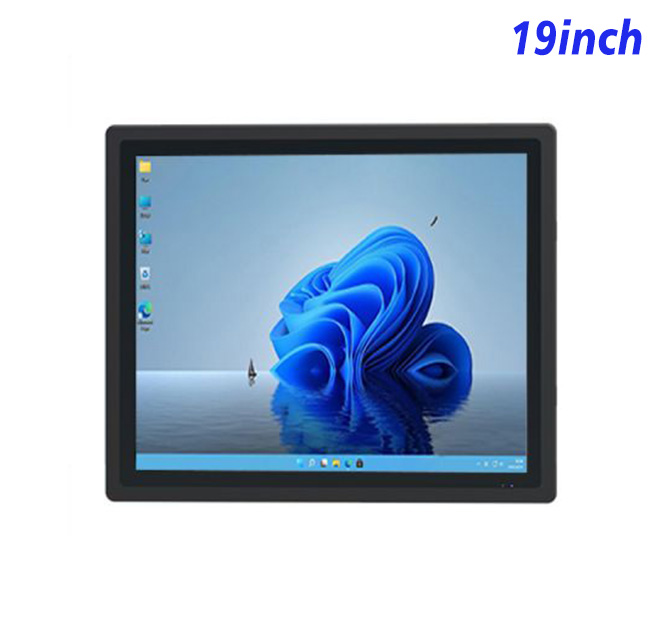
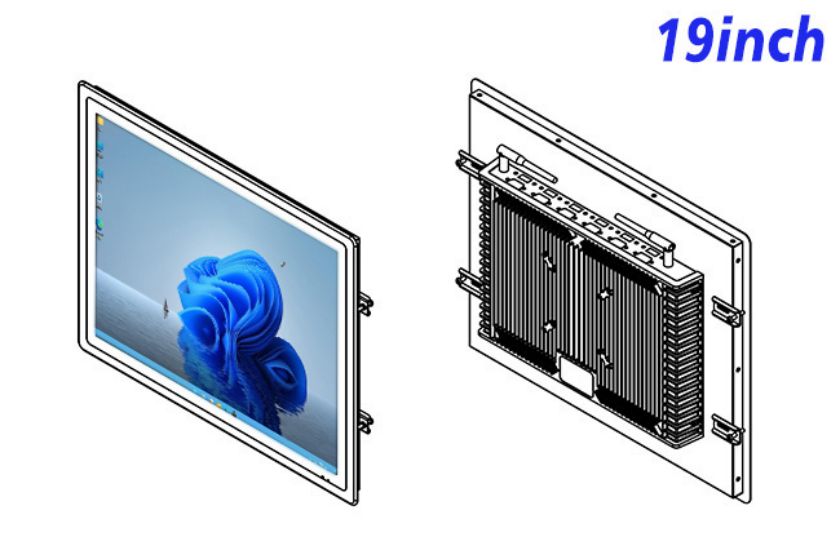
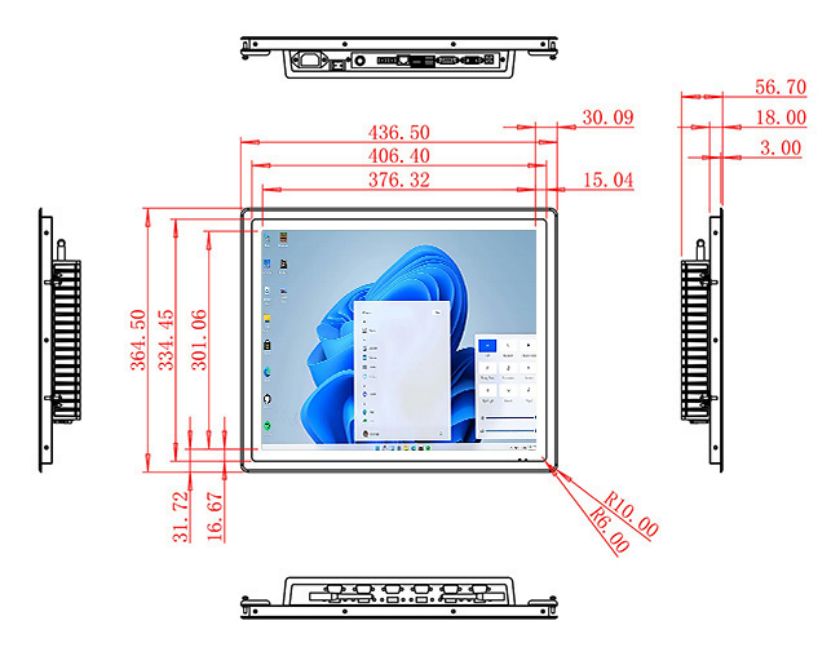
The registration kiosk is a 19-inch embedded Windows panel that can support a registration kiosk, hospital terminal or public-service interface. Its 1280 × 1024 resolution and 4:3 aspect ratio are useful for applications built around vertical forms, lists and status panels. The published active area is 376.32 × 301.06 mm, providing a compact screen for cabinet integration without forcing a legacy application into a widescreen layout.
This product is a platform component rather than a complete registration system. Identity verification, document scanning, ticket printing and database access depend on the project’s software and optional hardware.
| Specifications of 19-Inch External Embedded Industrial All-in-One Computer with Windows | ||||
| LCD Panel Parameters | Screen Size | 19 Inch | ||
| Display Area | 376.32 mm.(Height) X 301.06(Width)mm. | |||
| Aspect Ratio | 4 : 3 | |||
| LCD Type | a-Si TFT-LCD Monitor | |||
| Maximum Resolution | 1280 X 1024 | |||
| Display Color | 16.7m , 73% NTSC | |||
| Brightness | 250cd/m² | |||
| Contrast Ratio | 1000 : 1 | |||
| Viewing Angle (Up/Down/Left/Right) | 89°/89°/89°/89° (Type)(CR≥10) | |||
| Response Time | 14ms | |||
| LCD Panel Lifespan (Hours) | 60,000(Hour.) | |||
| Field Frequency | 60Hertz | |||
| Audio parameters | Audio system | Stereo | ||
| Speaker size | ≈ 99 x 45 x 20 mm | |||
| Impedance | 8 Ohm | |||
| Power | 2 x 5 Watt | |||
| Loudness | > 80 Decibel | |||
| Interface | 4-pin connector | |||
| Internal computer configuration (Choose one of two) |
CPU | Intel i5-4310M Generation 4, Dual-Core Four Threads, Main frequency can reach up to 2.7GHz | Intel I5-6100T Generation 6, Dual-Core Four Threads, Main frequency can reach up to 3.2GHz | |
| Graphics Card | Integrated Graphics Card Intel® HD 4600 | Integrated Graphics Card Intel® HD 530 | ||
| RAM | 4GB | 8GB | ||
| Storage Memory Capacity | 128GB | 256GB | ||
| OS | Win10 or win11 Optional | Win10 or win11 Optional | ||
| Wi-Fi Built-in | Speed 150Mbps 802.11n wifi Integrated | Speed 150Mbps 802.11n wifi Integrated | ||
| Media Format | Video Format | wmv, avi, flv, rm, rmvb, mpeg, ts, mp4 etc. | ||
| Audio Format | MP3, WMA | |||
| Photo Format | BMP, JPEG, PNG, GIF etc. | |||
| Onboard Interface | Network port | RJ45 X 1, 10M/100M Adjustable Ethernet | ||
| HDMI | 1 | |||
| USB | 4 | |||
| Power | Power Supply | Alternating Current 100V~240V, 50/60Hz | ||
| Maximum Power Loss | ≤ 30 Watt | |||
| Standby Mode Power Loss | < 1 Watt | |||
| Features | Operating Temperature | 0℃ ~ 50℃ | ||
| Storage Temperature | Below 10℃ ~ +60℃ | |||
| Package Size | Device Dimensions | 436.5 X 364.5 X 56.7 mm. | ||
| Net Weight | 6.5 Kilogram | |||
| Package Size | 52 X 44 X 15 Centimeter | |||
| Gross Package Weight per Unit | 7 Kilogram | |||
Design Registration Around Clear Progress
A registration process should tell users what information is needed, show progress and allow corrections before submission. The 4:3 screen can keep form fields and instructions visible together, but the application should avoid presenting an entire paper form at once. Short stages reduce confusion for first-time users.
A registration kiosk in a public location also needs a clear cancel function and automatic session clearing. Personal information should not remain after the user leaves. Screen placement, queue direction and viewing angle should be reviewed to reduce unintended exposure, particularly in medical or government settings.
Match Hardware to the Authorized Workflow
The existing page lists alternative Intel processor, memory and storage configurations. Buyers should identify the Windows version, application stack and database connection. If the workflow uses a camera, scanner, printer or reader, the integrator must confirm its interfaces, drivers and physical installation separately.
The product title references VGA and HDMI, but buyers should verify the selected connection set. Touch requirements also need confirmation. A sample can be used to test data entry, on-screen keyboard behavior, peripheral response and recovery after a network interruption.
Treat Outdoor Claims Carefully
The original title includes outdoor and waterproof language. Suitability must be based on the documented product configuration and the complete enclosure. The buyer should provide temperature, humidity, dust, water exposure, sunlight and cleaning requirements. A public terminal exposed to weather needs more than an embedded panel with a protected front.
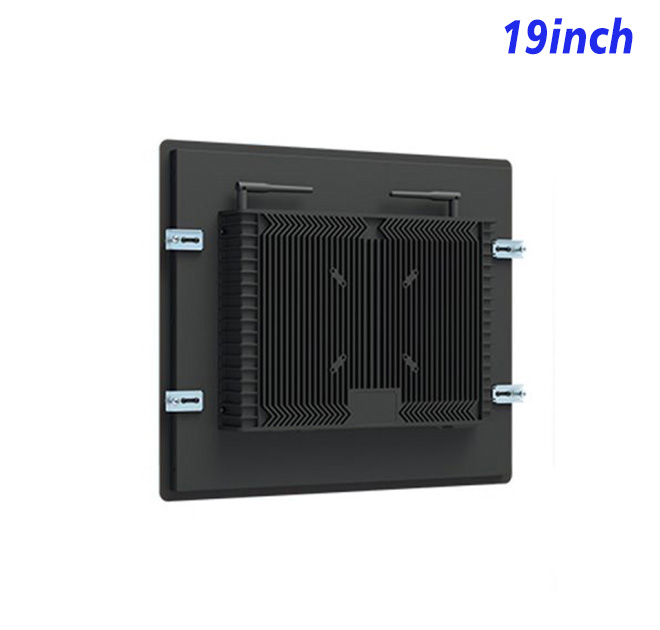
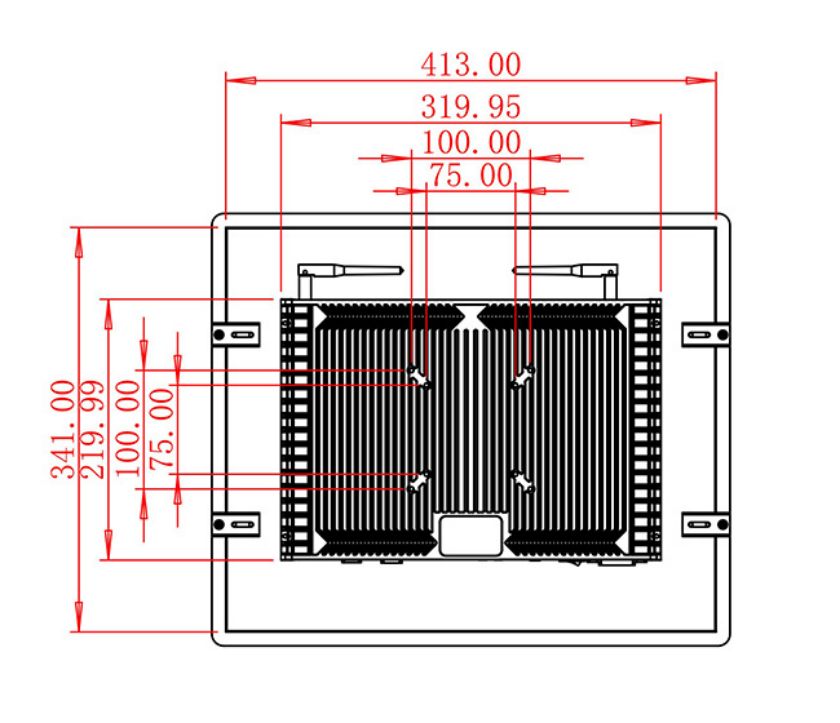
The cabinet drawing should account for cutout dimensions, mounting, ventilation, cable routing and technician access. The screen should remain replaceable without removing unrelated service hardware.
Validate the Complete Service Point
A pilot should run realistic cases, including incomplete data, invalid identification, a cancelled session and a staff handoff. Accessibility and readable type should be assessed by actual users. The authority or service provider remains responsible for legal notices and eligibility rules.
Daily operations need their own plan. Staff should know how to clean the screen, restart the application, replenish any external consumables and escalate a fault without accessing protected customer data. The service owner should also decide how long an unavailable terminal can remain offline and whether a spare unit or technician visit is the preferred response.
Change control is especially important for public registration. Forms, instructions and eligibility rules may be revised after hardware deployment. The application team should maintain approved versions and a rollback method, while the hardware configuration remains stable. This separation makes policy updates easier without reopening the physical design.
The rollout plan should also state how completed units are labeled, packaged, delivered and commissioned at each public-service location.
Commissioning records should confirm the installed software version and successful completion of the agreed test cases.
Provide ZXT LCD with the workflow, cabinet design, peripheral schedule, Windows image and rollout quantity. The team can configure the registration kiosk as the display platform for a registration kiosk and prepare a project quotation. Government contractors, healthcare integrators and kiosk manufacturers can request an engineering sample before volume supply.
If you would like to get the specification about above product, or you hope to discuss your requirements or need any additional information on our this product , then please do not hesitate to send us a inquiry and contact our sales team now.