

Make Information Available in a Compact Footprint
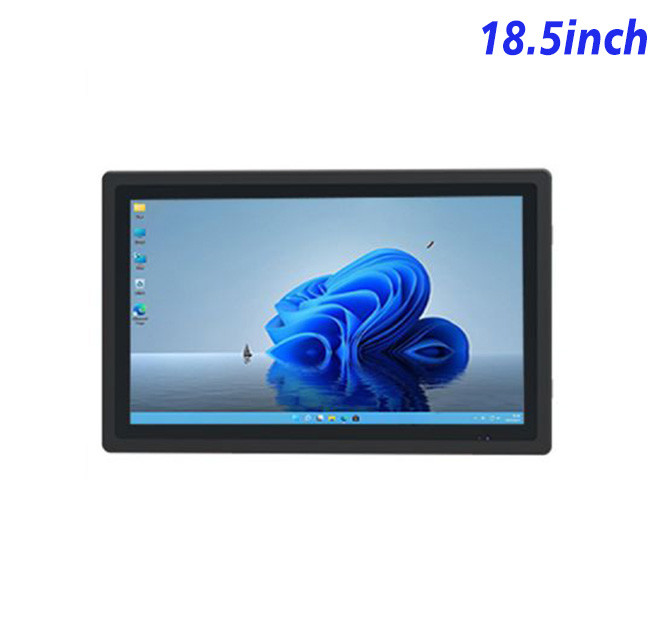
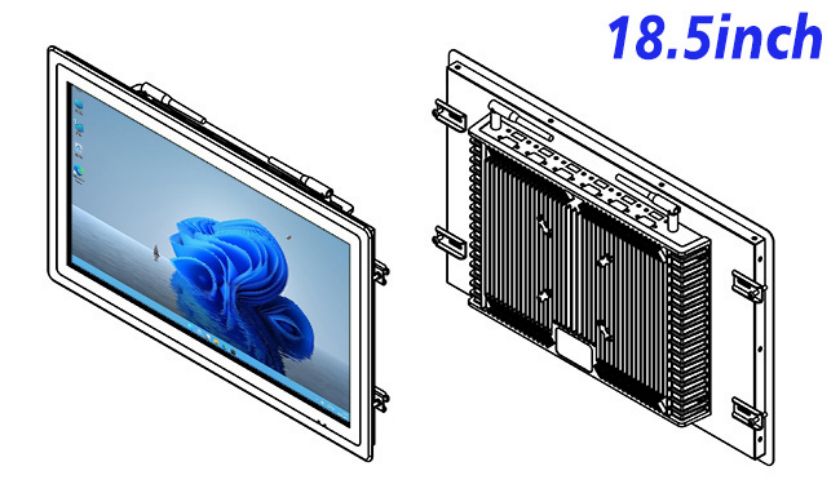
The information kiosk is an 18.5-inch open-frame Windows display for an information kiosk, public directory or embedded service fixture. Its published panel specification includes 1920 × 1080 resolution, a 16:9 aspect ratio and a 409.8 × 230.4 mm display area. It offers Full HD content in a smaller enclosure footprint than common 21.5-inch and 23.8-inch terminals.
This product forms the visual and computing platform. The buyer remains responsible for the application, cabinet, network and any additional devices. That modular scope is useful for OEM projects that already have software and industrial design resources.
| Specifications of 18.5-Inch Embedded Industrial All-in-One Computer with Windows | ||||
| LCD Panel Parameters | Screen Size | 18.5 Inch | ||
| Display Area | 409.8 mm.(Height) X 230.4(Width)mm. | |||
| Aspect Ratio | 16 : 9 | |||
| LCD Type | a-Si TFT-LCD Monitor | |||
| Maximum Resolution | 1920 X 1080 | |||
| Display Color | 16.7m , 72% NTSC | |||
| Brightness | 250cd/m² | |||
| Contrast Ratio | 1200 : 1 | |||
| Viewing Angle (Up/Down/Left/Right) | 89°/89°/89°/89° (Type)(CR≥10) | |||
| Response Time | 14ms | |||
| LCD Panel Lifespan (Hours) | 60,000(Hour.) | |||
| Field Frequency | 60Hertz | |||
| Audio parameters | Audio system | Stereo | ||
| Speaker size | ≈ 99 x 45 x 20 mm | |||
| Impedance | 8 Ohm | |||
| Power | 2 x 5 Watt | |||
| Loudness | > 80 Decibel | |||
| Interface | 4-pin connector | |||
| Internal computer configuration (Choose one of two) |
CPU | Intel i5-4310M Generation 4, Dual-Core Four Threads, Main frequency can reach up to 2.7GHz | Intel I5-6100T Generation 6, Dual-Core Four Threads, Main frequency can reach up to 3.2GHz | |
| Graphics Card | Integrated Graphics Card Intel® HD 4600 | Integrated Graphics Card Intel® HD 530 | ||
| RAM | 4GB | 8GB | ||
| Storage Memory Capacity | 128GB | 256GB | ||
| OS | Win10 or win11 Optional | Win10 or win11 Optional | ||
| Wi-Fi Built-in | Speed 150Mbps 802.11n wifi Integrated | Speed 150Mbps 802.11n wifi Integrated | ||
| Media Format | Video Format | wmv, avi, flv, rm, rmvb, mpeg, ts, mp4 etc. | ||
| Audio Format | MP3, WMA | |||
| Photo Format | BMP, JPEG, PNG, GIF etc. | |||
| Onboard Interface | Network port | RJ45 X 1, 10M/100M Adjustable Ethernet | ||
| HDMI | 1 | |||
| USB | 4 | |||
| Power | Power Supply | Alternating Current 100V~240V, 50/60Hz | ||
| Maximum Power Loss | ≤ 30 Watt | |||
| Standby Mode Power Loss | < 1 Watt | |||
| Features | Operating Temperature | 0℃ ~ 50℃ | ||
| Storage Temperature | Below 10℃ ~ +60℃ | |||
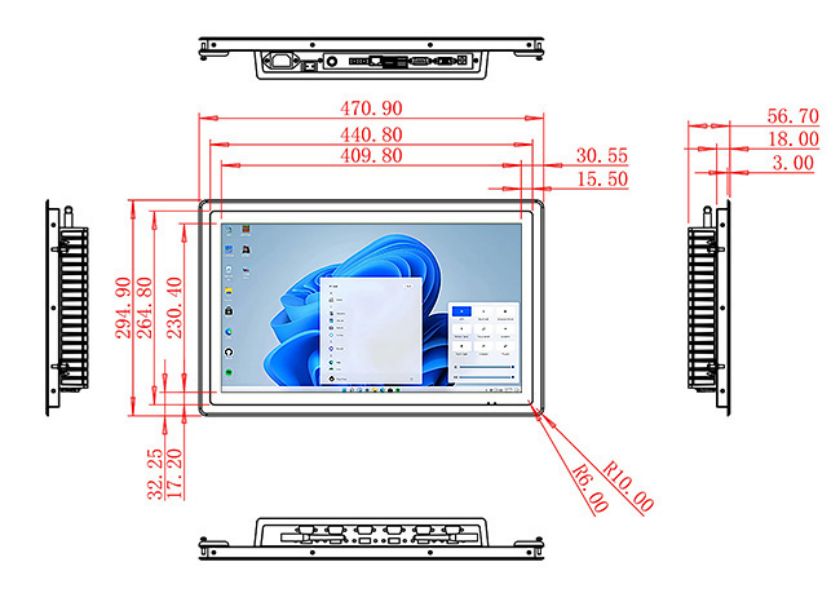
| Package Size | Device Dimensions | 470.9 X 294.9 X 56.7mm | ||
| Net Weight | 6.5 Kilogram | |||
| Package Size | 55 X 38 X 15Centimeter | |||
| Gross Package Weight per Unit | 7 Kilogram | |||
Match the Content to Short Visits
Users typically approach an information kiosk to answer one immediate question. A venue directory can emphasize destinations and routes; a government information point can organize services and required documents; a showroom terminal can present product groups. The opening screen should not make users search through company-wide content.
Full HD resolution supports detailed diagrams and media, but legibility depends on type size and contrast. The finished enclosure, front glass and lighting should be included in the review. A content prototype can be tested with people who have not seen the interface before.
Configure Windows Around the Application
The existing specification lists different Intel processor, memory and storage options. Buyers should identify whether content is hosted locally or online, how often it changes and whether the system runs video, search or analytics services. The chosen Windows build should also support the organization’s update and security policies.
USB and EETI references in the product title point to touch integration, but the precise touch controller and driver compatibility should be confirmed. Network ports, audio and other interfaces should be included in the technical schedule rather than assumed.
Design for Installation and Field Service
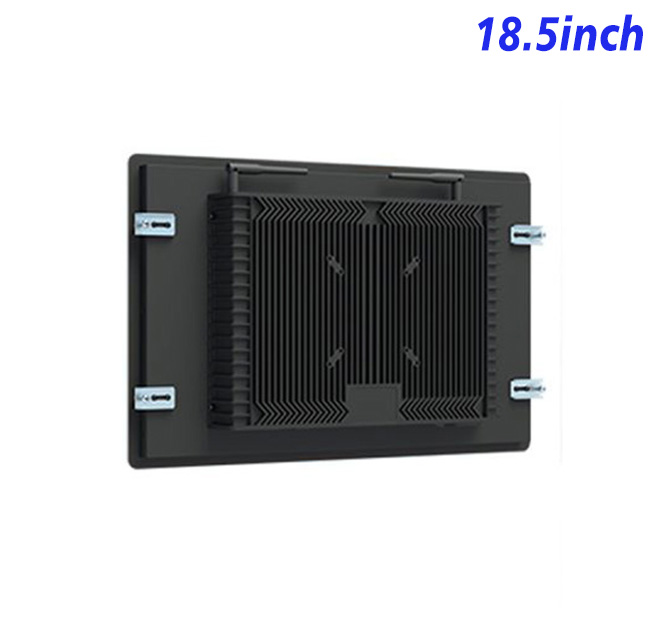
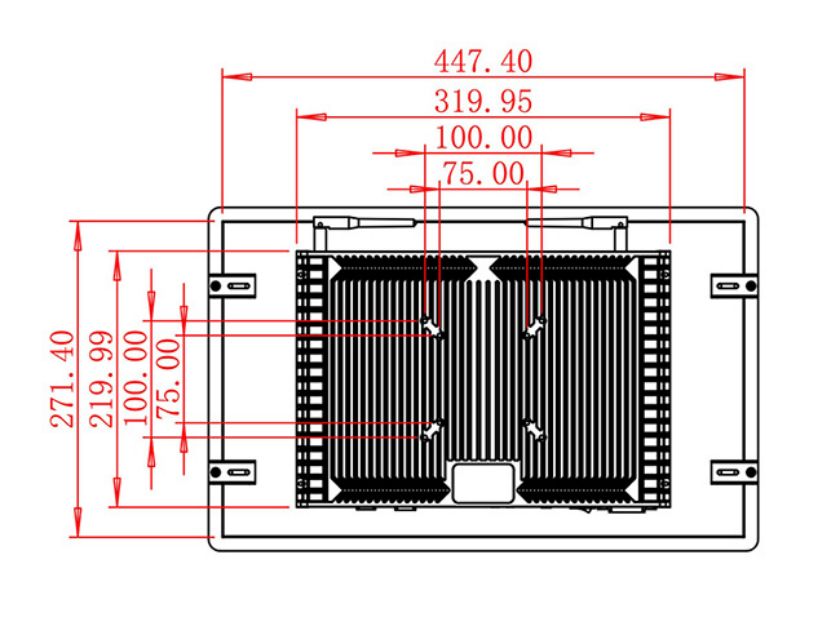
Open-frame projects require coordination between the screen and cabinet teams. Cutout size, active-area alignment, mounting, rear clearance, ventilation and cable retention all need drawing approval. The display should be accessible for replacement without damaging the finished front panel.
Public environments introduce cleaning and accidental contact. The project owner should define the required front protection, finish and maintenance routine. Environmental and impact ratings apply only when documented for the selected configuration or finished cabinet.
Approve the Actual User Experience
A first article can validate image quality, touch behavior, application startup and network recovery. Operational teams can check whether the content can be updated and whether fault reporting is clear. For a multi-site deployment, standardized drawings and spare-unit procedures reduce downtime.
Buyers should define how the terminal behaves when online content is unavailable. A controlled offline page, cached directory or clear service message is better than an unrestricted browser error. Recovery should occur automatically where the application supports it, and staff should have a documented escalation route when the connection does not return.
The procurement package can also specify asset labels, packaging, delivery grouping and installation documentation. These details matter when units are sent directly to many sites instead of one central assembly facility. Consistent labeling helps the support team match a reported device to its approved configuration.
Periodic content reviews should remove expired information and confirm that links, maps and contact routes still reflect current venue operations.
Feedback from local staff can identify confusing navigation or recurring questions that need clearer on-screen guidance.
Provide ZXT LCD with the application, interface list, cabinet drawing, site conditions and forecast quantity. The team can evaluate the information kiosk for an information kiosk and quote the confirmed configuration. Integrators and distributors can discuss sample testing, branded documentation and production scheduling.
If you would like to get the specification about above product, or you hope to discuss your requirements or need any additional information on our this product , then please do not hesitate to send us a inquiry and contact our sales team now.