

Let Visitors Explore at Their Own Pace
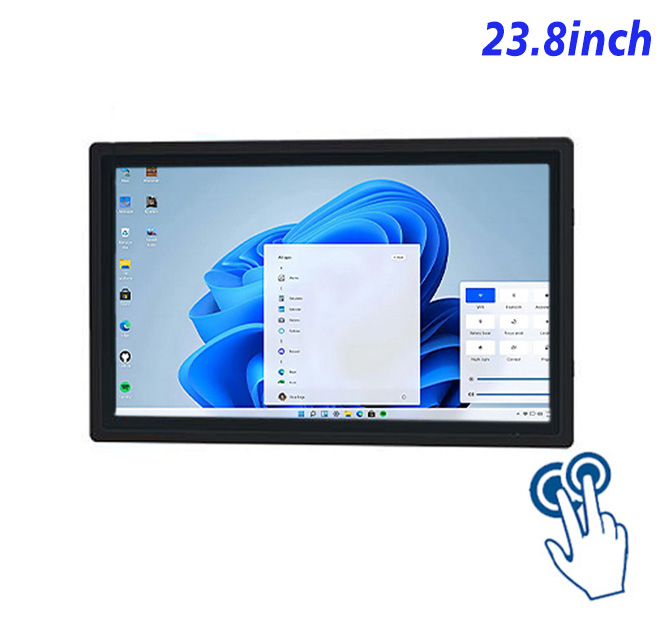
An exhibit cannot answer every visitor’s question with a single looping video. A customer service kiosk touch screen can let people select topics, compare objects, open timelines and choose language options. The 23.8-inch Full HD panel provides room for high-resolution media and clear navigation while remaining compact enough for a wall fixture or exhibit cabinet.
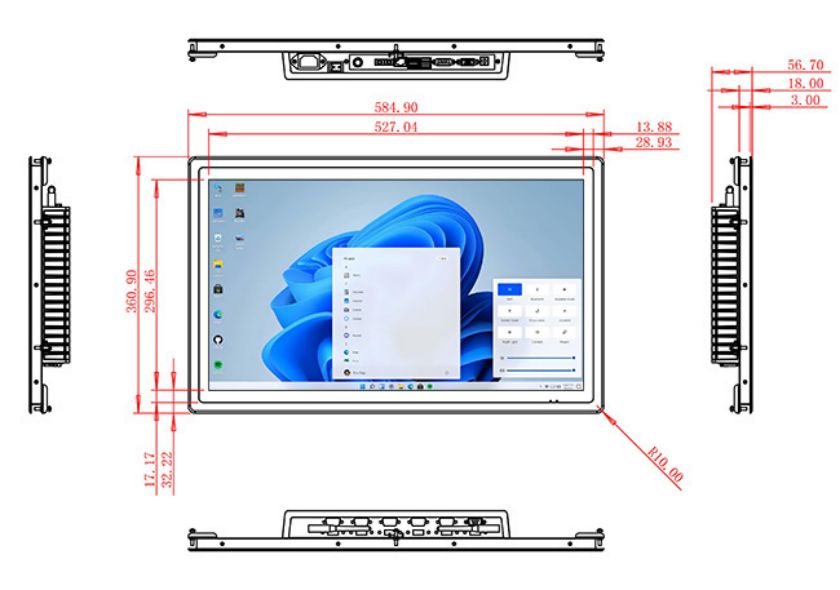
The display area is 527.04 × 296.46 mm, with 99% sRGB coverage, a 1000:1 contrast ratio and wide viewing angles. Brightness is 250 cd/m² for indoor galleries and controlled lighting. Reflections should be assessed if the screen faces exhibit lighting or a bright entrance.
Responsive Ten-Point Visitor Interaction
The PCAP layer supports ten touch points, USB communication and a response time below 6 ms. Its 3 mm optically bonded glass is described as strengthened and provides more than 85% transmission. The exhibit interface should use large targets, visible feedback and an automatic return to the welcome screen after inactivity.
Computer options include an i5-4310M with 4 GB RAM and 128 GB storage or an i5-6100T with 8 GB RAM and 256 GB storage. Windows 10 and Windows 11 are optional. Content complexity, video playback and application support should guide selection.
| Specifications for an external touch system all-in-one computer with a 23.8-inch external touch | ||||
| LCD Panel Parameters | Screen Size | 23.8 Inch | ||
| Display Area | 527.04 mm.(Height) X 296.46(Width)mm. | |||
| Aspect Ratio | 16 : 9 | |||
| LCD Type | a-Si TFT-LCD Monitor | |||
| Maximum Resolution | 1920 X 1080 | |||
| Display Color | 16.7m , 99% sRGB | |||
| Brightness | 250cd/m² | |||
| Contrast Ratio | 1000 : 1 | |||
| Viewing Angle (Up/Down/Left/Right) | 89°/89°/89°/89° (Type)(CR≥10) | |||
| Response Time | 14ms | |||
| LCD Panel Lifespan (Hours) | 60,000(Hour.) | |||
| Field Frequency | 100Hertz | |||
| PCAP Touchscreen Panel Parameters | Touch Pattern | Projected Capacitive Touchscreen Monitor | ||
| Touch Points | 10 Points | |||
| Cover Glass | Morse Glass Size 7 Physically reinforced to prevent explosion | |||
| Glass 3 mm. Optical mount to reduce parallax | ||||
| Glass Transmission | >85% (Higher light transmission depends on glass coating technology For example AR/AG) >85% | |||
| Response Speed | < 6ms | |||
| Touch Accuracy | More than 90% of the touch area ±2 mm | |||
| Touch Method | Inch Stylus | |||
| Output Format | Coordinate Output | |||
| Click Time | Unlimited | |||
| Smallest Touch Size | 5 mm | |||
| Long-lasting Durability | Yes, Available | |||
| Touch Interface | USB | |||
| Operating Temperature and Humidity | Below 10℃ ~ +50℃, ≤ 85%RH | |||
| Storage Temperature and Humidity | Less than 20℃ ~ +60℃, ≤ 90%RH | |||
| Audio parameters | Audio system | Stereo | ||
| Speaker size | ≈ 99 x 45 x 20 mm | |||
| Impedance | 8 Ohm | |||
| Power | 2 x 5 Watt | |||
| Loudness | > 80 Decibel | |||
| Interface | 4-pin connector | |||
| Internal computer configuration (Choose one of two) |
CPU | Intel i5-4310M Generation 4, Dual-Core Four Threads, Main frequency can reach up to 2.7GHz | Intel I5-6100T Generation 6, Dual-Core Four Threads, Main frequency can reach up to 3.2GHz | |
| Graphics Card | Integrated Graphics Card Intel® HD 4600 | Integrated Graphics Card Intel® HD 530 | ||
| RAM | 4GB | 8GB | ||
| Storage Memory Capacity | 128GB | 256GB | ||
| OS | Win10 or win11 Optional | Win10 or win11 Optional | ||
| Wi-Fi Built-in | Speed 150Mbps 802.11n wifi Integrated | Speed 150Mbps 802.11n wifi Integrated | ||
| Media Format | Video Format | wmv, avi, flv, rm, rmvb, mpeg, ts, mp4 etc. | ||
| Audio Format | MP3, WMA | |||
| Photo Format | BMP, JPEG, PNG, GIF etc. | |||
| Onboard Interface | Network port | RJ45 X 1, 10M/100M Adjustable Ethernet | ||
| HDMI | 1 | |||
| USB | 4 | |||
| Power | Power Supply | Alternating Current 100V~240V, 50/60Hz | ||
| Maximum Power Loss | ≤ 45 Watt | |||
| Standby Mode Power Loss | < 1 Watt | |||
| Features | Operating Temperature | 0℃ ~ 50℃ | ||
| Storage Temperature | Below 10℃ ~ +60℃ | |||
| Package Size | Device Dimensions | 584.9 X 360.9 X 56.7mm | ||
| Net Weight | 8 Kilogram | |||
| Package Size | 66 X 44 X 17Centimeter | |||
| Gross Package Weight per Unit | 9 Kilogram | |||
Connect Exhibit Peripherals and Networks
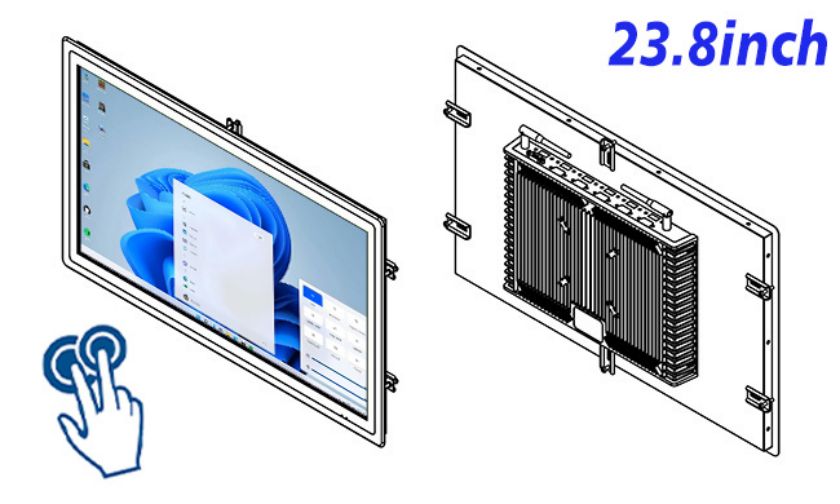
The customer service kiosk touch screen platform provides Ethernet, integrated Wi-Fi, four USB ports and HDMI, together with two 5 W speakers. Museums can connect approved external devices, but compatibility, drivers and cable access should be tested with the actual application.
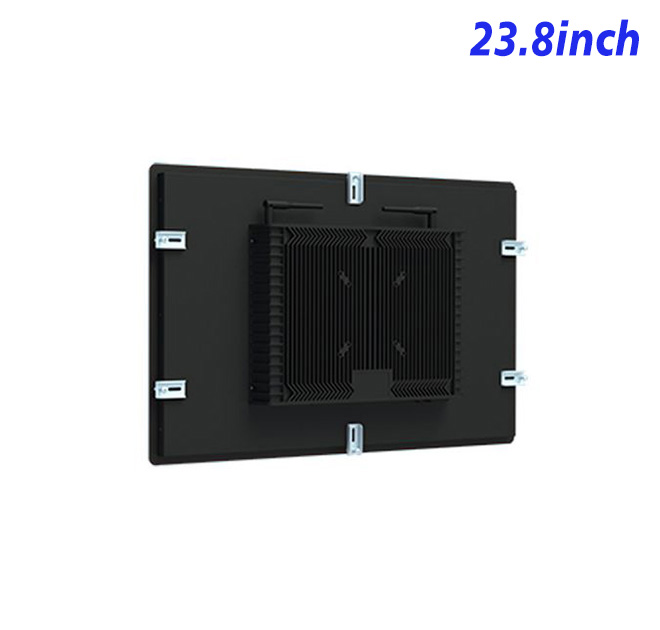
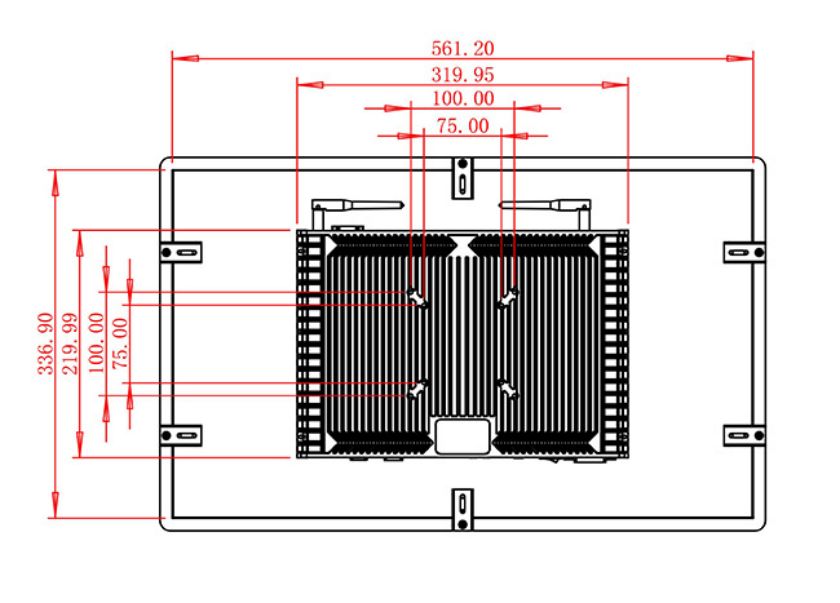
The enclosure measures 584.9 × 360.9 × 56.7 mm and weighs around 8 kg. It uses 100–240 V AC, consumes up to 45 W and operates from 0°C to 50°C. The final exhibit must provide secure mounting and public-use protection.
Support for Repeat Exhibitions
ZXTLCD can review the Windows configuration, drawing and peripheral plan with exhibit builders. A sample gives curators and designers an opportunity to test text size, touch navigation, audio and accessibility. The approved customer service kiosk touch screen configuration can then be repeated across galleries or traveling exhibits.
Interactive Exhibit FAQ
Staff training can then focus on content recovery and visitor assistance instead of undocumented hardware differences.
Exhibit builders should also plan how staff reach the computer and USB connections after the panel is enclosed. A service door, labeled cables and a documented restart procedure can shorten downtime without exposing controls to visitors. These mechanical details are especially important for traveling exhibitions that are assembled repeatedly.
Exhibit teams should test the application with visitors who did not help design it. Curators often understand labels, timelines and navigation patterns that first-time guests find confusing. Observing real use can reveal whether touch targets are large enough, whether users recognize the return control and how long they remain at the station. The findings can improve content without changing the hardware.
A public installation should also define its recovery behavior. The application can clear the previous visitor’s choices, return to the opening page and report a disconnected peripheral to staff. Audio should have a defined idle state so several nearby exhibits do not compete continuously. Testing these details on the customer service kiosk touch screen creates a stronger acceptance standard for both fixed galleries and traveling displays.
Is exhibit content included? No. The buyer supplies the Windows application, media and content-management process.
Can multiple visitors touch the screen at once? The hardware supports ten touch points, but multi-user behavior depends on application design and installation width.
Can the front glass withstand public use? Strengthened 3 mm glass is listed, but the completed exhibit should still assess impact risk and mounting security.
—
Request Product Information
If you would like to get the specification about above product, or you hope to discuss your requirements or need any additional information on our this product , then please do not hesitate to send us a inquiry and contact our sales team now.