

Bring Context Closer to the Decision
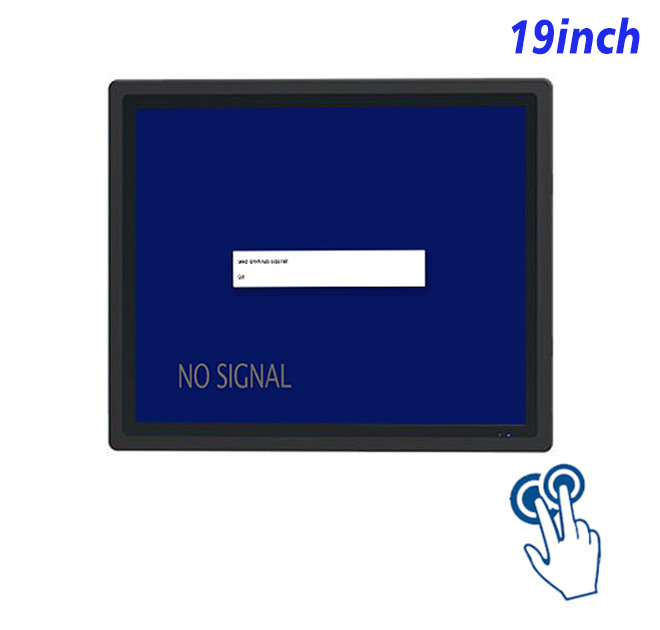
The commercial value of a information kiosk comes from helping a user complete a specific task. For repair ticket lookup and status, the 19-inch touch monitor creates a permanent interaction surface without pretending to be the complete kiosk.
Customers can enter a repair reference, review progress and read collection instructions without adding another staffed enquiry queue. The application can keep primary actions visible, move secondary information into short supporting screens and give users a clear result before the session resets.
Screen and Touch Characteristics
The panel provides 1280 × 1024 resolution, 250 cd/m² brightness, a 1000:1 contrast ratio and wide viewing angles. Its projected capacitive layer supports ten touch points, responds in under 6 ms and uses 3 mm strengthened cover glass with more than 85% transmission. These specifications suit protected indoor installations and do not establish sunlight readability or weather resistance.
The information kiosk display connects to an external host rather than including Windows or Android computing. This separation lets an integrator select processing performance, storage, operating system and application environment for the project.
| 19-Inch Embedded Industrial Capacitive Touchscreen Display Specification Document | ||||
| LCD Panel Parameters | Screen Size | 19 Inch | ||
| Display Area | 376.32 mm.(Height) X 301.06(Width)mm. | |||
| Aspect Ratio | 4 : 3 | |||
| LCD Type | a-Si TFT-LCD Monitor | |||
| Maximum Resolution | 1280 X 1024 | |||
| Display Color | 16.7m , 73% NTSC | |||
| Brightness | 250cd/m² | |||
| Contrast Ratio | 1000 : 1 | |||
| Viewing Angle (Up/Down/Left/Right) | 89°/89°/89°/89° (Type)(CR≥10) | |||
| Response Time | 14ms | |||
| LCD Panel Lifespan (Hours) | 60,000(Hour.) | |||
| Field Frequency | 60Hertz | |||
| PCAP Touchscreen Panel Parameters | Touch Pattern | Projected Capacitive Touchscreen Monitor | ||
| Touch Points | 10 Points | |||
| Cover Glass | Morse Glass Size 7 Physically reinforced to prevent explosion | |||
| Glass 3 mm. Optical mount to reduce parallax | ||||
| Glass Transmission | >85% (Higher light transmission depends on glass coating technology For example AR/AG) >85% | |||
| Response Speed | < 6ms | |||
| Touch Accuracy | More than 90% of the touch area ±2 mm | |||
| Touch Method | Inch Stylus | |||
| Output Format | Coordinate Output | |||
| Click Time | Unlimited | |||
| Smallest Touch Size | 5 mm | |||
| Long-lasting Durability | Yes, Available | |||
| Touch Interface | USB | |||
| Operating Temperature and Humidity | Below 10℃ ~ +50℃, ≤ 85%RH | |||
| Storage Temperature and Humidity | Less than 20℃ ~ +60℃, ≤ 90%RH | |||
| Audio Parameters (External Speaker Option) |
Audio system | Stereo | ||
| Speaker size | ≈ 99 x 45 x 20 mm | |||
| Impedance | 8 Ohm | |||
| Power | 2 x 5 Watt | |||
| Loudness | > 80 Decibel | |||
| Interface | 4-pin connector | |||
| Onboard Interface | HDMI Input | 1 | ||
| VGA Input | 1 | |||
| DVI Input | 1 | |||
| USB Type B or any desired USB Type | 1 | |||
| Power | Power Supply | Alternating Current 100V~240V, 50/60Hz | ||
| Maximum Power Loss | ≤ 30 Watt | |||
| Standby Mode Power Loss | < 1 Watt | |||
| Features | Operating Temperature | 0℃ ~ 50℃ | ||
| Storage Temperature | Below 10℃ ~ +60℃ | |||
| Accessories | Power Cord Length | 1.5m | ||
| HDMI Cable Length | 2m | |||
| USB-A to USB-B Cable Length | 1.5m | |||
| Stereo Speaker Size with Connector | 99*45*20mm | |||
| Stereo Speaker Length | 1.5m | |||
| Package Size | Device Dimensions | 436.5 X 364.5 X 56.7 mm. | ||
| Net Weight | 6.5 Kilogram | |||
| Package Size | 52 X 44 X 17 Centimeter | |||
| Gross Package Weight per Unit | 7 Kilogram | |||
Designing the Host System
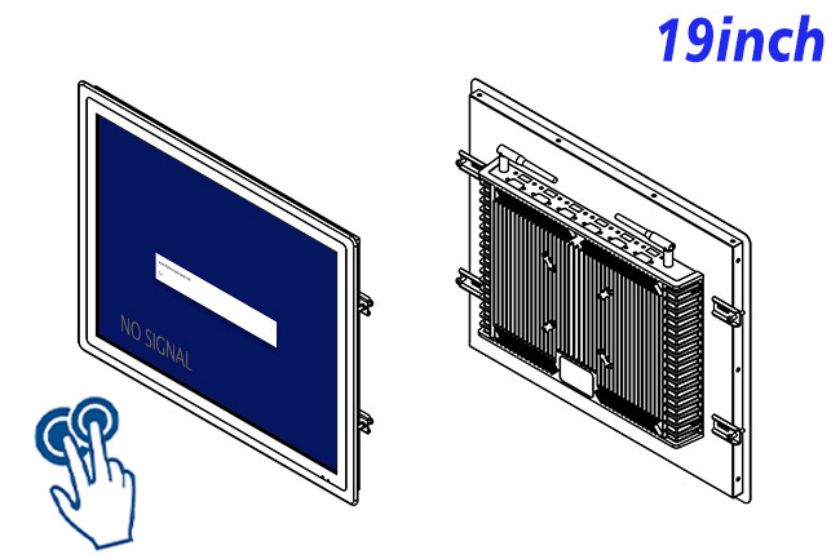
Mounting Review
The host should be selected after reviewing software workload, graphics output, touch driver, network policy and peripheral requirements. Recovery behavior matters as much as normal performance: the interface should explain a lost connection instead of leaving a permanent loading screen.
Content Ownership
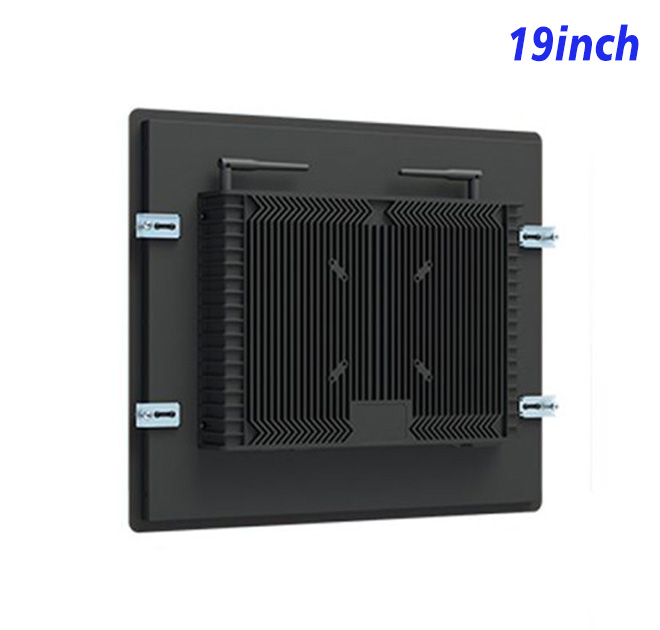
Cabinet opening, mounting depth, ventilation, cable strain relief and access to video, USB and power connections should be confirmed from drawings. The display should remain serviceable without removing unrelated payment, printer or scanner modules.
Button size, timeout behavior, language switching and confirmation messages should be tested with representative users. A pilot often reveals whether the opening screen is understood and where staff intervention is still required.
From Pilot Feedback to Production
ZXTLCD supports OEM display projects through specification and drawing review before production. Buyers can share quantity, viewing environment, mounting design, host configuration and connected peripherals so the proposed information kiosk reflects the actual installation.
For volume delivery, record the approved panel, touch glass, connectors, labeling and packing method. Configuration control helps distributors compare incoming units with the pilot and gives service partners a reliable reference for replacement requests.
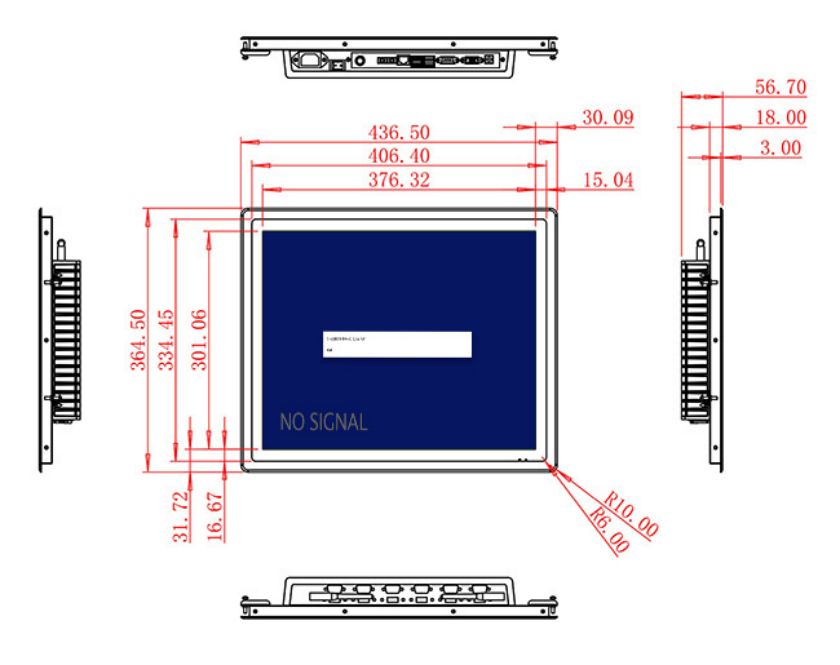
Content, Operations and Total Project Cost
Hardware is only one part of the installed result. Software licensing, cabinet fabrication, site labor, network setup, content maintenance and support influence total cost. Procurement teams should identify who owns each part before orders are released.
Daily maintenance also affects customer perception. Staff need a simple route for cleaning, restarting the host application and reporting whether a fault belongs to the monitor, computer, network or peripheral. Clear ownership reduces downtime and prevents a small issue from becoming an abandoned service point.
A measured rollout creates stronger evidence than an oversized first order. Teams can observe completion rate, common errors and support calls, then improve the interface before repeating the design across more sites. This approach strengthens the business case while preserving flexibility for later software or peripheral changes.
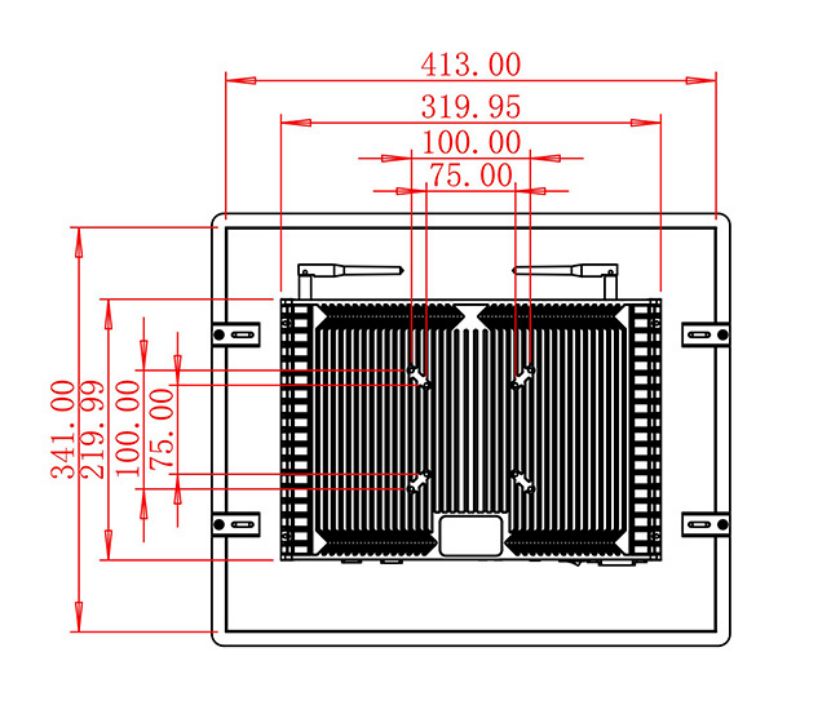
Acceptance Criteria before Shipment
The approved sample should be compared with the production specification before shipment. Buyers can document active display area, native resolution, touch response, connector layout, mounting points and cosmetic expectations. A short functional test can cover video input, USB touch communication, power recovery and continuous display operation with the intended host.
Documentation for Installers
Installation partners benefit from current drawings, connector identification and handling guidance. When the same screen is deployed in several cabinet types, each mounting arrangement should be reviewed rather than assuming one drawing applies everywhere. This preparation reduces site improvisation, protects the front glass and gives the customer a more consistent finished result.